No Copy


No Right Click

Selamat Datang di Situs Belajar PLC dan SCADA

Blog gratis yang menyajikan berita seputar PLC dan SCADA.

Microsoft Windows 10

Berita seputar Microsoft Windows 10. Membahas berbagai informasi mengenai Microsoft windows terbaru.

Apple OSX

Artikel yang membahas tentang OSX terbaru dari Apple tentu sangat menarik untuk dibaca. Tak kalah serunya jika kita paham mengenai tips dan trik yang ada didalamnya.

Photography

Photography asik dan menarik jika kita mengetahuinya lebih dalam. Disini kita bisa melihat berbagai hal dari sudut pandang photo. Menarik untuk dipahami.

Sunday, January 22, 2023

Learn more about SIMATIC STEP 7 - TIA Portal Projec "Ready-for-use“ for SIWAREX WP321

Ready-for-use TIA Portal 

TIA Portal example project for S7-1500
(S7-1511 and KTP700 Basic or MTP700 Unified Comfort) in German, English, French, Spanish and Italian consisting of HMI visualization and WP321 function block (multiinstance ability).

7MH4138-6AA00-0BA0 

SIWAREX WP321 WEIGHING ELECTRONIC (1 CHANNEL) FOR STRAIN GAUGE LOAD CELLS / FULL BRIDGES (1-4 mV/V) FOR SIMATIC ET200SP, FITS to BU-TYPE A0, RS485- INTERFACE FOR CONNECTION OF SIWATOOL OR A REMOTE DISPLAY Detailed load cell diagnostics possible with digital junction box SIWAREX DB (7MH5001-0AD20 or 7MH5001-0AD0


The .zip-file includes the following components:

  • TIA Portal V15.1, V16, V17 and V18 project with SIWAREX WP321 – KTP 700 Basic
  • TIA Portal V15.1, V16, V17 and V18 project with SIWAREX WP321 and SIWAREX DB – KTP700 Basic
  • TIA Portal V17 and V18 project with SIWAREX WP321 and SIWAREX DB - MTP 700 Unified Comfort

ATTENTION:
STEP 7 V17 Update 4 and Unified Panel Image and/or Unified Runtime V17 Update 4 is required to use the Project including the MTP 700 Unified Comfort Panel.


TIA Portal example project for S7-300 and S7-400 
(S7-315-2 PN/DP and TP700 Comfort or KTP700 Basic) in German, English, French, Spanish and Italian consisting of HMI visualization and WP321 function block (multiinstance ability). Please use / copy the function block included in the project for all other CPU of the 300 and 400 series as well.

The .zip-file includes the following components:

  • TIA Portal V15.1, V16, V17 and V18 project with SIWAREX WP321 – TP 700 Comfort
  • TIA Portal V15.1, V16, V17 and V18 project with SIWAREX WP321 and SIWAREX DB – KTP700 Basic

========================================================================================

Ready-for-use-small TIA Portal

TIA Portal example project (S7-1511 and KTP700 Basic) in German, English, French, Spanish and Italian consisting of HMI visualization and WP321 function block (multiinstance ability) with lower memory demand. This function block has the the data records 3, 6, 10 and 14 available only, which allow the commissioning of the scale, the definition of the limits, as well as the selection of the process values read by cyclic I/O communication.

All further data records, as well as the advanced error message system and the multiplexed commands 1, 2 and 3 are not available by this type of function block
!

The .zip-file includes the following components:

  • TIA Portal V13 SP1, V14, V15, V15.1, V16, V17 and V18 project with SIWAREX WP321 – KTP 700 Basic

 Login required  Download (36,6 MB)

========================================================================================

Library TIA Portal 

TIA Portal V13, V14, V15, V15.1, V16, V17 and V18 global block library with all available WP321 function blocks for S7-1200, S7-1500 and S7-Software Controller

ATTENTION: It’s important to choose the right project/library relating to the CPU firmware version!

 Login required  Download (24,4 MB) 

========================================================================================

Ready-for-use SIMATIC Manager

The S7-Classic project includes a ready-to-use project with a SIWAREX WP321 connected to a CPU 315-PN/DP and a HMI with WP321 function block (multiinstance ability). Please use / copy the function block included in the project for all other CPU of the 300 and 400 series as well.

The .zip-file includes the following components:

  • Simatic Manager V5.5 SP4 project with SIWAREX WP321 and KTP600 (WinCC flexible 2008 SP3)
  • Simatic Manager V5.6 SP2 project with SIWAREX WP321, SIWAREX DB and KTP 700 (TIA Portal V15.1)

  Download (3,4 MB)

========================================================================================

Ready-for-use-small SIMATIC Manager

The Simatic-Manager project-archive (SIMATIC Manager V5.5 SP4 is required) includes a ready-to-use project with a SIWAREX WP321 connected to a CPU 315-PN/DP and a HMI (KTP600 Basic) with WP321 function block (multiinstance ability) with lower memory demand. This function block provides access to the data records 3, 6, 10 and 14 only, which allow the commissioning of the scale, the definition of the limits, as well as the selection of the process values read by cyclic I/O communication.

All further data records, as well as the advanced error message system and the multiplexed commands 1, 2 and 3 are not available with this type of function block!

 Registrierung notwendig  Download (3,9 MB)

========================================================================================

TIA Portal example project to program several SIWAREX WP321 in one project.

The TIA Portal Project is based on the example project for S7-1500 in German and English, it has been developed in order to connect several scales to a 1500-CPU or 1200-CPU which is connected to a panel. This   document (2,2 MB) describes the procedure. 

The .zip-file includes the following components:

  • TIA Portal V15.1, V16, V17 and V18 project with SIWAREX WP321 – TP 700 Comfort

 Login required  Download (30,8 MB) 

========================================================================================

TIA portal library for Siwarex WP321 to limit the simultaneously use of system function data record read and / or write

The library is created for 1200 and 1500 CPU’s. The function block “WP321_Token” is an extension of the “WP321_Multiplex” getting started. This   document (568,9 KB) describes the procedure.

 Registrierung notwendig  Download (228,3 KB)

PLC Programming with SIMATIC STEP7


Innovative engineering for both proven and new SIMATIC controllers

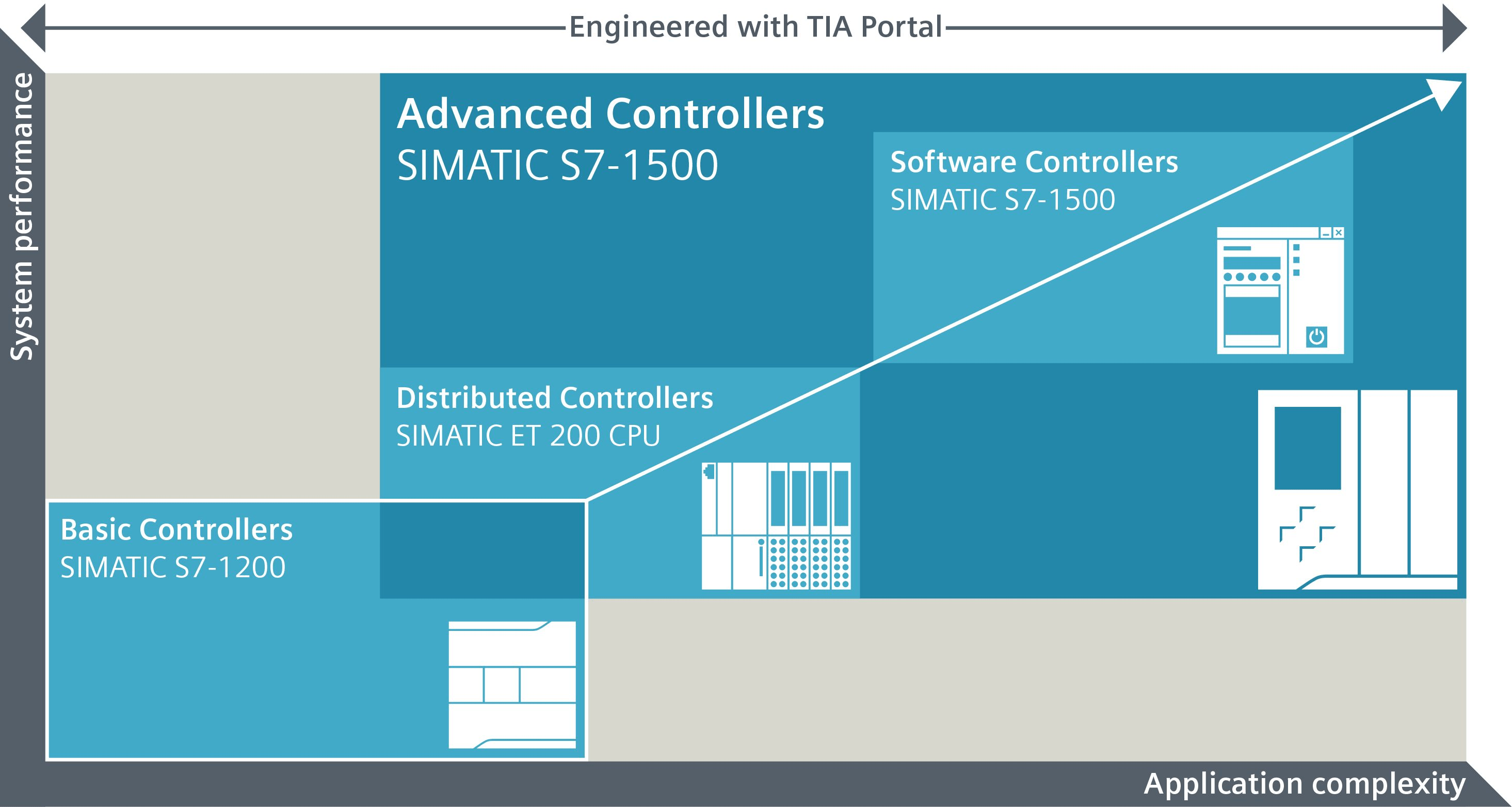
SIMATIC STEP 7 (TIA Portal) continues the success story of SIMATIC STEP 7. With SIMATIC STEP 7 (TIA Portal), you can configure, program, test, and diagnose the Basic, Advanced and Distributed Controllers of all generations, whether PLC- or PC-based, including software controllers.

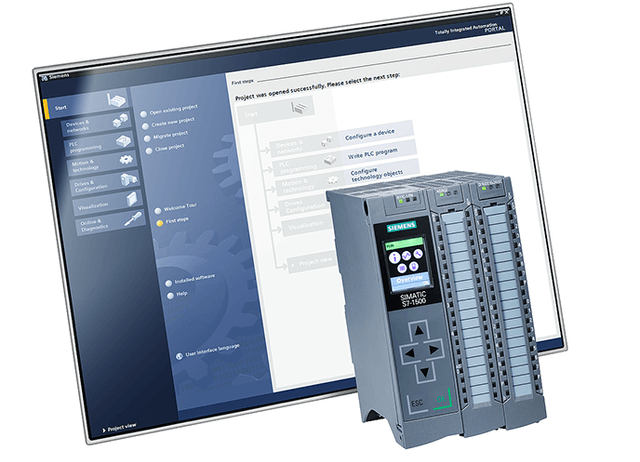
 STEP 7 (TIA Portal) helps you perform your engineering tasks intuitively and efficiently. Thanks to its integration in TIA Portal, STEP 7 offers transparency, intelligent user navigation, and straightforward workflows in every work and programming step. Functions such as drag & drop, copy & paste, and Auto Complete make work much quicker and easier.

 SIMATIC STEP 7 offers maximum user-friendliness, regardless of whether you‘re a beginner in the engineering field or already have many years of experience. For new users, the engineering is easy to learn and apply, whereas for experts, it’s fast and efficient.


SIMATIC STEP 7 in TIA Portal is the comprehensive engineering tool for configuring and programming SIMATIC controllers, whether PLC- or PC-based.

SIMATIC STEP 7 Professional (TIA Portal) can be used to configure, program, test, and diagnose all generations of SIMATIC controllers. 

SIMATIC STEP 7 Basic (TIA Portal) is the price-optimized subset of STEP 7 Professional software that can be used both for engineering the SIMATIC S7-1200 Basic Controllers and for configuring the SIMATIC HMI Basic Panels, because WinCC Basic is part of the software package.


Application-oriented licensing

Today’s automation solutions must overcome a variety of challenges. To do this, they require high-performance software that is as efficient, flexible, and reliable as possible, both now and in the future. By choosing the right license for your individual application, you’ll keep your software cost-effectively up to date.

 Download, please check this link: 

https://support.industry.siemens.com/cs/document/109772803/simatic-step-7-inkl-safety-und-wincc-v16-trial-download?dti=0&lc=de-WW


Saturday, April 18, 2020

EPLAN Electric P8 2.2 32 Bit / 64 Bit

EPLAN Electric P8 2.2 32 Bit / 64 Bit Overview

EPLAN Electric P8 2.2 32 Bit / 64 Bit is an amazing application that allows users to develop and create hardware projects and also offers users to manage them too. Users can design electrical circuits with flexibility, efficiency, quality and accuracy with great degree of creation. Users can develop their circuits and can save time, efforts, and resource costs. It has simple and easy to use application.
EPLAN Electric P8 2.2 32 Bit / 64 Bit is designed and developed with the latest technologies and functions through which there are more possibilities and capabilities open for users. Users can achieve the documentation and phases of the whole project timeline from installation, start-up, production and also maintenance, its includes everything. Users can transmit data of different project files with the help of CAE class software. It is equipped with various features which let users design with a whole new level such as Automatic and individual mode for designing devices and connections, Automatic cross-reference between Points, Symbols, Outputs and more.

Features of EPLAN Electric P8 2.2 32 Bit / 64 Bit

  • Design, Develop and create circuit boards.
  • Simple and easy to use.
  • Design with flexibility, efficiency, quality and more.
  • Includes Documentation and all levels of the project life cycle.
  • Transmit data of different project files.
  • Equipped with various features.
  • Latest technologies.
EPLAN Electric P8 2.2 32 Bit 64 Bit Free Download-GetintoPC.com

EPLAN Electric P8 2.2 32 Bit / 64 Bit Technical Setup Details

  • Software Full Name: EPLAN Electric P8 2.2 32 Bit / 64 Bit
  • Setup File Name: EPLAN_ElectricP8_2.2.zip
  • Full Setup Size: 2.2 GB
  • Setup Type: Offline Installer / Full Standalone Setup
  • Compatibility Architecture: 32 Bit (x86) / 64 Bit (x64)
  • Latest Version Release Added On: 17th Oct 2019
  • Developers: EPLAN Software
EPLAN Electric P8 2.2 32 Bit 64 Bit Direct Link Download-GetintoPC.com

System Requirements For EPLAN Electric P8 2.2 32 Bit / 64 Bit

Before you start EPLAN Electric P8 2.2 32 Bit / 64 Bit free download, make sure your PC meets minimum system requirements.
  • Operating System: Windows XP/Vista/7/8/8.1/10.
  • Memory (RAM): 1 GB of RAM required.
  • Hard Disk Space: 2.2 GB of free space required.
  • Processor: Intel Dual Core processor or later.

ELCAD / AUCOPlan 2019

ELCAD / AUCOPlan 2019 Overview

ELCAD / AUCOPlan 2019 is a versatile application designed and developed with various functions, CAE system and more to address users needs for performing electrical and mechatronics processes and tasks. The application offers ideal flexibility and handy tool for design and development. Create diagrams, terminals, maps, input and output lists, wiring, cable lists, graph assembly and installation. 
ELCAD / AUCOPlan 2019 is a simple solution with a professional working environment allowing users to work with ease and reliability. The application includes various features to optimize and improve their working experience such as it has a high-performance system in the network, for better capability and support the application includes different settings and options to customize the application. It has wide support for language for a huge reach and engagement. Other than above, it has process editing for running batch reports and batches with a few clicks, sort terminal diagrams from different positions. 

Features of ELCAD / AUCOPlan 2019

Below are some noticeable features which you’ll experience after ELCAD / AUCOPlan 2019 free download.
  • Perform electrical and mechatronics tasks.
  • Simple and easy to use.
  • Flexible and equipped with handy tools.
  • Optimize and improve the working experience.
  • High performance.
  • Run batch reports and scripts.
  • Multi support for the language.
ELCAD AUCOPlan 2019 Direct Link Download-GetintoPC.com

ELCAD / AUCOPlan 2019 Technical Setup Details

  • Software Full Name: ELCAD / AUCOPlan 2019
  • Setup File Name: ELCAD_AUCOPlan_2019_v17.14.zip
  • Full Setup Size: 712 MB
  • Setup Type: Offline Installer / Full Standalone Setup
  • Compatibility Architecture: 32 Bit (x86) / 64 Bit (x64)
  • Latest Version Release Added On: 25th Feb 2020
  • Developers: Aucotec
ELCAD AUCOPlan 2019 Latest Version Download-GetintoPC.com

System Requirements For ELCAD / AUCOPlan 2019

Before you start ELCAD / AUCOPlan 2019 free download, make sure your PC meets minimum system requirements.
  • Operating System: Windows XP/Vista/7/8/8.1/10.
  • Memory (RAM): 1 GB of RAM required.
  • Hard Disk Space: 800 MB of free space required.
  • Processor: Intel Dual Core processor or later.

Software Terbaik Untuk Electrical Desainer

Electrical design software offers a rapid and accurate method of designing integrated electrical systems. Electrical design systems offer easier component selection as well as integration with the existing component without the risk of failure. Electrical control design software facilitates automatic equipment and cables list generation simplifying the task of the electrical engineers. Moreover, with the assistance of electrical designs, engineers can reduce errors and comply with industry standards. GoodFirms understands the need to have an efficient electrical software to achieve the unparalleled designing process. Hence, the researchers at GoodFirms have curated the list to help you find the best software for your project.

1. Eplan.
2. Elcad Aucotec.
3. IGE+XAO.
4. Autocad Electrical.
5. Solidwork Electrical.
6. PCSchematic.


Links Of PLC

This is the links address for PLC Maker.
Please click below, which brand of PLC or Control System Integrator you prepare..!

ABB/Elsag Bailey/Alfa Laval
Alfa Laval/ABB/Elsag Bailey
Allen-Bradley
ALSTOM/Cegelec
Aromat/Matsushita
Array Electronics
AutomationDirect/PLC Direct/Koyo/
B&R Industrial Automation
Bachmann
Beck Electronic/Festo
Beckhoff
Berthel gmbh
Bosch
Bristol Babcock
Cegelec/ALSTOM
CNI
Control Microsystems
Crouzet Automatismes
Control Technology Corporation
Cutler Hammer/IDT
Delta
Divelbiss
Eberle/GE-Fanuc (Europe)
Elsag Bailey/ABB/Alfa Laval
Elsist
Entertron
Fatek Automation
Festo/Beck Electronic
FF Automation
Fisher & Paykel
Fuji Electric
GE-Fanuc
GE-Fanuc/Eberle (Europe)
Gefran/SIEI
Giddings & Lewis
Gould/Modicon
Groupe Schneider
Hima
Hitachi
Honeywell
Horner Electric
Ibercomp
Idec
IDT/Cutler Hammer
Industrial Control Links
International Parallel Machines
Jetter gmbh
Keyence Corporation
Kirchner Soft
Klockner-Moeller
Koyo/AutomationDirect/PLC Direct
LG Industrial Systems
Liyan Electric
Matsushita (Europe)/Aromat
Messung
Microconsultants/SPLat
Mitsubishi
Modicon/Gould
Moore Products/Siemens
Nyquist/P8
Omron
Opto22
P8/Nyquist
Pilz
Pixsys
PLC Direct/Koyo/AutomationDirect
Poscon
Reliance
Rockwell Automation
Rockwell Software
RTP Corporation
SAIA-Burgess
Schleicher
Schneider Electric
Selectron
Sharp
Shihlin
SIEI/Gefran
Siemens/Moore Products
Sigmatek
Sixnet
SMAR
SoftPLC/Tele-Denken
SPLat/Microconsultants
Square D
Teco a. s.
Tele-Denken/SoftPLC
Telemecanique
Toshiba
Toyoda/Toyopuc
Triangle Research
Triconex
Unitronics
Yokogawa
The PLCopen(IEC 61131-3)

Wednesday, November 23, 2016

PLC Programming Tutorial for Beginners

In this lesson we will learn how to write a PLC program using an "S7 300” PLC and “STEP 7” software.
We have two pumps which are being used to transfer two separate liquids into this tank.Inside the tank there are two level switches installed in the lower and upper parts of the tank respectively.

There is also an electrically powered mixer inside the tank which starts working for a defined period of time, mixing the two liquids together after the tank has filled.
We also have a discharge valve in the bottom of the tank which controls the draining of the liquid from the tank.
When the level of the liquid drops to the level of the switch's position the contact closes, sending a 24 volt DC signal to the PLC input.

We want to write the program so that when the level of the liquid reaches this minimum, the pumps will be activated and begin filling the tank with the liquids. 
The pumps continue filling the tank until the level reaches its maximum at the higher level switch. When this happens the open contacts in the switch will be closed and another 24 volt signal will be sent to the PLC input telling us that the tank is full. 

When this signal has been sent, first the pumps should shut down so that no more liquid enters the tank, and then this mixer should be turned on.

We want the mixer to operate for seven seconds, mixing the liquids that have been pumped into the tank.
After seven seconds the mixer should automatically shut down and this discharge valve should open.
With the valve open the liquid will be discharged from the tank and transferred to another location within the factory to be processed.

When the level of the liquid in the tank drops to the minimum set level of the lower switch, the switch contacts will close again thus starting a repeat of the cycle!


This is the third video of “star-delta starter PLC program and wiring video series”. In this video you’re going to learn the wiring of star-delta starter. 
The basic concept of star-delta starter is to first run the motor in the star connection for a few seconds to reduce the start current. Then when the motor has gained sufficient speed, change the winding connections to delta. 

PLC Training_Star-Delta Starter PLC program and Wiring_ Part 1:
https://youtu.be/skcaCBxyNSk

PLC Training_ Star-Delta Starter PLC Program and Wiring_Part 2:
http://youtu.be/FOKSkCR6JQY

PLC Training_ Star-Delta Starter PLC Program and Wiring_Part 3:
https://youtu.be/aEkQuqEdlVA

PLC Training_ Star-Delta Starter PLC Program and Wiring_Part 4:
https://youtu.be/SOZwFUzTQsU

PLC Training_ Star-Delta Starter PLC Program and Wiring_Part 5:
https://youtu.be/qA3Yg5CS-F8

PLC Training_ Star-Delta Starter PLC Program and Wiring_Part 6:
https://youtu.be/J9RMP8l3vDA

PLC Training_ Star-Delta Starter PLC Program and Wiring_Part 7:
https://youtu.be/0q-CDJinDVw

PLC Training_ Star-Delta Starter PLC Program and Wiring_Part 8:
https://youtu.be/nqlEK_ERTxk

PLC Training_ Star-Delta Starter PLC Program and Wiring_Part 9:
https://youtu.be/fiPSMyFIiFY


Siemens PLC - What exactly is Profibus-DP in layman's terms?

Today Profibus-DP is one of the most commonly used networks in industrial automation. Profibus stands for “Process Field Bus” and “DP” sands for “Decentralized Peripherals”. In this video we’re going to learn all about Profibus-DP and what exactly it decentralizes.

Using Profibus-DP, instead of wiring each individual sensor, actuator or other facility to the PLC individually, we can install a set of “remote I/Os” next to these facilities in the field area and then transfer the data to the control area using a single RS-485 cable. This can decrease the cost of wiring dramatically and on the top of that, since the data transmission method here is “digital”, industrial environment noise has less of an impact on data, so data communication between the control and field areas will be more robust.


Saturday, November 12, 2016

Siemens TIA Portal

Divisi Industri Otomatisasi dari Siemens saat ini memperkenalkan Totally Integrated Automation Portal (TIA Portal) – software otomatisasi pertama dengan Engineering Environment dan Software project terpadu. Software ini memudahkan para penggunanya untuk melakukan pengembangan dan komisioning terhadap sistem otomatisasi secara cepat dan intuitif, yang memberikan efisiensi lebih terhadap waktu dan biaya yang diakibatkan oleh adanya berbagai macam software dalam melakukan integrasi. Didesain sedemikian rupa untuk efisiensi tinggi dan penggunaan yang mudah, TIA Portal telah disesuaikan untuk para pemula dan professional. Untuk selanjutnya TIA Portal ini merupakan dasar utama dari semua paket software engineering di kemudian hari untuk konfigurasi, pemrograman dan komisioning produk perangkat otomatisasi yang ada dalam portofolio produk Totally Integrated Automation dari Siemens. Sebagai contoh adalah New Simatic Step 7 V11 automation software untuk Simatic PLC dan Simatic WinCC V11 untuk Simatic HMI (Human machine Interface) dan aplikasi visualisasi.
Desain dari TIA Portal ini, Siemens telah mempelajari banyak aplikasi software engineering yang ada beberapa tahun ini serta mengamati dan melakukan evaluasi terhadap kebutuhan para penggunanya di seluruh dunia. Sebagai komponen dari perangkat engineering software Siemens, TIA Portal memberikan shared services yang lebih maju antar configuration interfaces yang menjamin keseragaman navigasi kepada para penggunanya serta sistem yang konsisten. Sebagai contoh, semua perangkat dan jaringan di dalam system automasi sekarang ini dapat dikonfigurasikan melalui satu perangkat dan editor jaringan. Project navigation, library concepts, data management, project storage, diagnostics dan online function merupakan layanan standard yang tersedia untuk para pengguna TIA Portal ini. Software development environment gabungan ini menawarkan tingkat efisiensi yang tinggi di seluruh project automation yang di dalamnya terdapat programmable controllers, HMI devices dan Drives. Sebagai tambahan, semua data management untuk parameter-parameter pada controller, block-block, tag-tag atau messages ini hanya memerlukan sekali input – sangat menghemat waktu dan biaya software engineering dari project itu sendiri. TIA Portal ini didesain berdasarkan advanced object-oriented software architecture serta data management yg terpusat, yang memberikan konsistensi data yang berkesinambungan secara otomatis untuk menghindari error pada data entry. Para pengguna dapat dengan mudah menemukan data yang diinginkan dan program blocks dari seluruh automation project menggunakan project-wide cross-reference system, yang dapat mengurangi waktu troubleshooting dan debugging program program project yang ada.
Aplikasi terpadu yang baru ini memungkinkan semua Programmable Controller Siemens, HMI operator panel dan drives dikonfigurasikan melalui satu environment development yang sama. Kelebihan ini dapat menurunkan biaya interfacing serta konfigurasi pada layanan-layanan yang biasa dilakukan ketika pengaturan komunikasi antar controllers, drives dan HMI devices. Sebagai contoh, pengguna hanya perlu melakukan drags and drops sebuah tag yang ada di dalam PLC, seperti sinyal dari modul I/O ke dalam tampilan HMI. Tag tersebut secara otomatis terbentuk di dalam HMI dan koneksi antara controller dengan HMI akan ter-create secara otomatis tanpa diperlukan konfigurasi manual.
Engineering software Simatic Step 7 V11 pada TIA Portal, dapat mendukung PLC Siemens seperti Simatic S7-1200 controllers, Simatic S7-300 dan Simatic S7 400 controllers serta PC-based automation system Simatic WinAC. Dengan cakupan programmable controllers yang luas memungkinkan Simatic S7 V11 untuk memenuhi tuntutan kinerja dan kemampuan yang menyeluruh dari sebuah software engineering untuk automation system. Kelebihannya adalah pemindahan konfigurasi yang ada di dalam Simatic Controllers dan HMI devices ke dalam project software baru hanya memerlukan waktu yang cukup singkat sehingga dapat menghemat waktu dan biaya untuk proses migrasi.
Simatic WinCC V11 yang baru ini juga berpatokan pada TIA Portal yang termasuk di antaranya konfigurasi machine-level application yg menggunakan HMI operator panels yang mendukung model panel Simatic TP dan MP, Simatic HMI Comfort Panel dan PC-based SCADA (Supervisory Control and Data Acquisition) process visualization system. Konfigurasi dan commissioning untuk Sinamics inverter drive nantinya juga akan dikembangkan di dalam TIA portal ini. (kpl/sie/roc)

Migration Guide: SIMATIC S7-300/400 to SIMATIC S7-1500

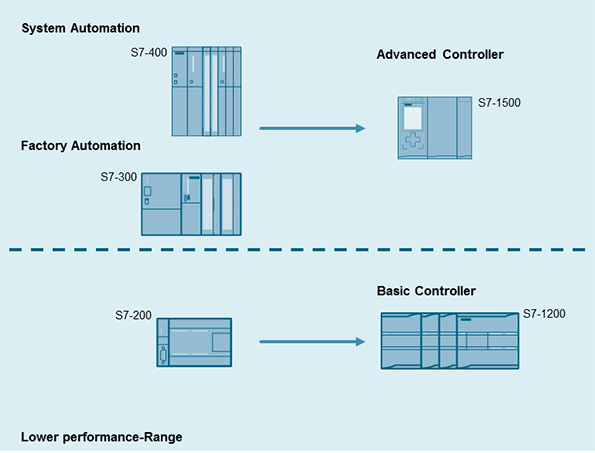
This migration guide contains recommendations and notes for users who are currently using SIMATIC S7-300/400 automation systems and plan to migrate to the new SIMATIC controller generation S7-1500.


The new controller generation SIMATIC S7-1500 has an up-to-date system architecture and, together with TIA Portal, offers new and efficient programming and configuration options. To be able to use these advantages, it is important that users who are currently using SIMATIC S7-300/S7-400 automation systems and plan to migrate to the new SIMATIC controller generation SIMATIC S7-1500, develop a detailed comprehensive concept for planning and implementing the pending migration. This requires thorough clarification in the run-up to migration.

Figure 1
  

The objective of this document is to support plant migration to a modern controller generation and cover the most important questions that may arise in this context. This document contains recommendations and notes for this migration.
This document covers the following key issues relating to plant migration from S7-300/S7-400 to S7-1500:

  • Planning a plant migration
  • System architecture S7-300/S7-400 and S7-1500
  • Hardware migration
  • Software conversion
  • Overview of the most important recommendations
  • Comparison of SIMATIC S7-300/S7-400 and S7-500 components

NoteThis document is not valid with SIMATIC S7-400 in combination with PCS 7.


#