No Copy


No Right Click

Selamat Datang di Situs Belajar PLC dan SCADA

Blog gratis yang menyajikan berita seputar PLC dan SCADA.

Microsoft Windows 10

Berita seputar Microsoft Windows 10. Membahas berbagai informasi mengenai Microsoft windows terbaru.

Apple OSX

Artikel yang membahas tentang OSX terbaru dari Apple tentu sangat menarik untuk dibaca. Tak kalah serunya jika kita paham mengenai tips dan trik yang ada didalamnya.

Photography

Photography asik dan menarik jika kita mengetahuinya lebih dalam. Disini kita bisa melihat berbagai hal dari sudut pandang photo. Menarik untuk dipahami.

Showing posts with label siemens. Show all posts

Friday, May 22, 2015

Clock synchronization between a HMI operator panel and a SIMATIC PLC

Depending on the required time synchronization and the used SIMATIC controller, this application shows the right solution.
IntroductionIn order for components, such as, for example, HMI operator panels and SIMATIC controllers to work in a plant with identical time, one of the listed components has to be the timer for all other components.
  • The component acting as timer is called clock master.
  • The time receiving components are clock slaves.

TaskThere are several HMI operator panels in a plant that exchange data with a SIMATIC controller.
The following tasks are to be implemented:
  1. In the first job, a HMI operator panel is to be the timing component.
    (HMI operator panel → SIMATIC controller)
  2. In the second job, a SIMATIC controller is to be the timer component.
    (SIMATIC component → HMI operator panel)
Solution
WinCC TIA Portal offers various solutions for the task described. The solutions depend on the
SIMATIC controller used and the required clock synchronization.
The application shows the respective options of clock synchronization and their implementation in the program.
Possible clock synchronizations
  • HMI clock synchronization (master)
  • HMI clock synchronization (slave)
  • Area pointer: Date/Time
  • Area pointer: Date/Time PLC
  • Area pointer: Control job 14 and 15
For each clock synchronization an example project is stored. Pre-programmed function blocks reduce your configuration effort. 
The description is valid for the following SIMATIC controllers and
HMI operator panels.
  • SIMATIC controllers
    • SIMATIC S7-1200
    • SIMATIC S7-1500
    • SIMATIC S7-300
    • SIMATIC S7-400
  • HMI Operator devices
    • SIMATIC Basic Panels
    • SIMATIC Panel
    • SIMATIC Comfort Panel
    • SIMATIC Multi Panel
    • SIMATIC Mobile Panel
    • SIMATIC RT Advanced
Documentation und example projekt
  Documentation (2,4 MB)
 Registrierung notwendig  Example project for WinCC and STEP 7 V13 SP1 (36,1 MB)
 

Thursday, April 23, 2015

Siemens vs Allen-Bradley: Function Blocks

iemens and Rockwell Automation are two giants competing in industrial automation technology today.  Rockwell (aka Allen-Bradley) seems to be more popular in the US market, but Siemens has a larger international customer base.  A cursory Google search will reveal that there is no lack of debate among automation professionals over which one is preferred.
On the higher end of their PLC lines, the programming environments to use are:
  •   Siemens - Step 7 Simatic Manager for S7-300 and 400 level PLCs
  •   Allen-Bradley (AB) - RSLogix 5000 for the Control Logix and Compact Logix PLCs 
As someone who uses both platforms regularly, I would like to compare one of the key differences between them - function blocks.

What's a function block?

Siemens uses the term Function Block (FB) for program routines that can have internal memory, as opposed to Function Calls (FC) that have only temporary internal memory.  Function blocks are a fundamental concept in the Siemens platform, which give them a significant advantage for large, modular applications.
In AB’s RSLogix 5000 version 16 and higher, reusable function blocks are called Add-On Instructions (AOI) and can be defined with interface parameters and local tags.  Since this feature was only added in 2007, it is often overlooked and doesn’t fit as seamlessly into the overall environment.
Why use function blocks, you ask?  You must read the DMC blog: "IEC 61131-3 Function Blocks - Unleash the Power!"
It is worth mentioning that both platforms adhere to the IEC-61131-3 standard, which means that function blocks are available and can be written in any of the standard's languages.

Interfacing to an instance of a function block

The way you interface to a function block is critical for program efficiency, readability, and development time.  The point of a reusable function block is to wrap up complex or repetitive code and make a simple and easy to use interface in order to use that code.  For example, when I visit a fast food drive-thru, I don’t need to tell them how to make a burger.  They have made billions before mine.  I just want to give my order, watch my burger come out the window, and then be on my way.
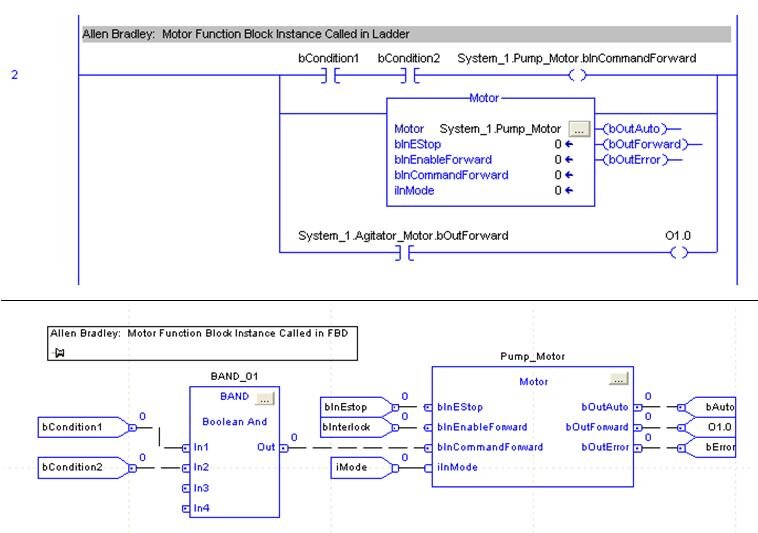
In AB:  Parameters in ladder have to be referenced independently from the function block call
If the function block instance is called in ladder, the input parameters can only be assigned with the block call if they are constants.  Variable inputs must be assigned to input parameters in preceding ladder rungs.  Outputs must be referenced in ladder rungs following the function block call.  If calling the function block instance in FBD (function block diagram), then variables can be directly assigned to input and output parameters.
Disadvantage:  More rungs of ladder to maintain.  If called in FBD instead, then there are restrictions on instance declaration (see below) and simple Boolean logic is more complicated because you must use the FBD function boxes instead of contacts and coils.

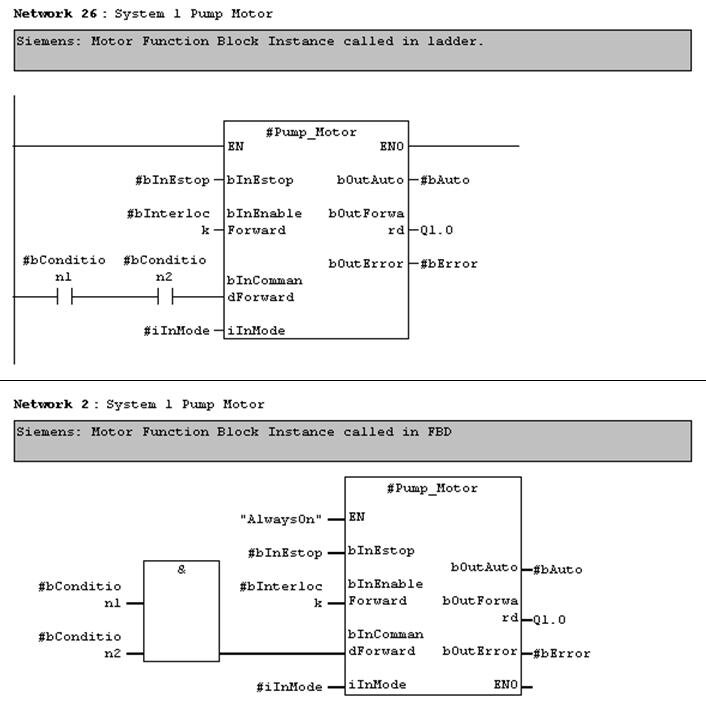
In Siemens:  Parameters are directly interfaced in both ladder and FBD
Function block instances that are called in ladder and FBD are essentially the same.  Even in ladder, variables can be assigned directly to input parameters.  Boolean input parameters can also be assigned to the result of ladder logic operations.  Function block outputs can be assigned directly to variables in the same rung of ladder.
Note that function block input and output parameters can also be accessed symbolically from other rungs in ladder logic (just like the AB example above), but Siemens has the additional advantage of directly assigning input and output parameters in the same rung as the function block call.
Advantage:  All input and output parameter assignment for a function block instance can be consolidated in one rung and not spread out on separate rungs or throughout the program.

Declaring an instance of a function block

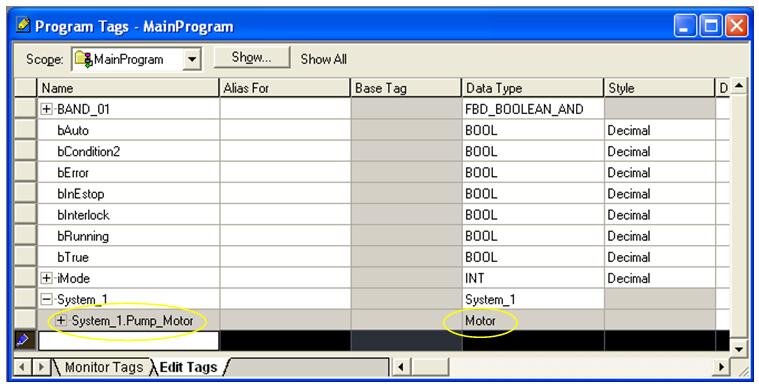
In AB:  Limited to program tag file.  If using FBD, cannot reside in a UDT
Instances of AOIs are most commonly declared in the “Program Tags” file of a program folder.   Even for very modular programs, all function blocks are listed in this one common location.  Instances can be declared within UDTs (user-defined types), but not if you want to use them in the FBD environment.
Advantage:  Simplicity.  One location to look through for each program folder.

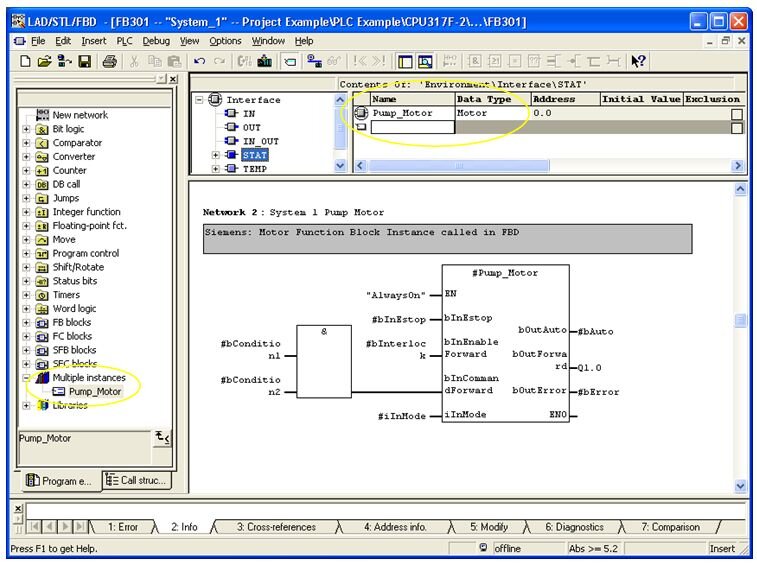
In Siemens:  Memory resides in an instance data block, but is declared within parent function blocks.
Most program logic, not just reusable logic, is located within function blocks.  “Parent” function blocks are assigned an instance data block.  All reusable function block instances can be declared within the parent function block’s static memory.
Advantage:  Modularity.  Instances are declared within the function block that they are called.

Summary 

In summary, Siemens seems to offer a little more flexibility in how function blocks are interfaced and instantiated.  We have seen, however, that both Allen Bradley and Siemens offer solutions for reusable function blocks on their higher-end PLCs.  Both Function Blocks in Siemens and Add-On Instructions in Allen Bradley will enhance the modularity and maintainability of your PLC program.  

Friday, April 8, 2011

SIMATIC Selection Tool

Jika anda seorang Projek Manager yang menangani Automation System menggunakan PLC Siemens. Ada baiknya mengetahui Software Selection Tool Ini.
Bagaimana kehebatan software ini? Silahkan cek link dibawah ini.

The SIMATIC Selection Tool helps you to pick your SIMATIC hardware quickly and accurately. Simply put together your Stations (LOGO!, S7-200, S7-1200, S7-300, S7-400, S7-400H) and select the I/O (ET 200S, ET 200M, ET 200pro, ET 200iSP, ET 200eco, ET 200eco PN, ET200 L). You can then configure the appropriate cables for connecting the stations via SIMATIC NET (PROFIBUS, PROFINET). You can select SIPLUS products for corrosive environmental conditions or extreme temperature ranges. In addition you can also set up SIMOTION and SINUMERIK stations.
You then automatically transfer the generated parts list to the shopping cart of the Siemens Industry Mall, where you can place your order in the usual fast, easy way.


Silahkan cek linknya disini!

Tuesday, March 23, 2010

Siemens Premium Studio 2009

Siemens AGImage via Wikipedia
Premium Studio 2009 provides you with the most important software packages for engineering and runtime for SIMATIC S7/C7, SIMATIC HMI, SIMATIC NET, SINUMERIK und SIMOTION on four data carriers (DVDs). The user can select general settings (e.g. languages for installation, installation path, etc.) and the software packages he requires via a setup specially created for Premium Studio. The installation is then performed automatically (silent), i.e. no further user activities are required. Premium Studio thus provides a significant time and money saving with the installation and maintenance of the software packages. No licenses are included with Premium Studio. For productive operation of the installed software products the user can either use his existing licenses of the versions in question or he must purchase new licenses. Premium Studio 2009 is now available for delivery. 


Product information
Premium Studio will significantly reduce the time and expenses for installation and maintenance of the Siemens Industrial Automation and Siemens Drives Technology software products. This will improve productivity and reduce the overall costs (Total cost of ownership). The benefit to the user increases all the more, the more software products from Siemens Industrial Automation and Siemens Drives Technology are being used.

Fully automatic installation by the Premium Studio Setup
  • One-time selection of the settings required for all software packages, e.g. installation path
  • No further user activities are needed during installation
  • Automatic updating of the existing PG/PC/PCU.50 installations by the products contained on the Premium Studio DVD 
Installation of the selected software in the correct sequence
  • The Premium Studio Setup ensures that any required installation sequences are adhered to.
Reduction of administration and handling (Zero Admin) 
  • Once the software products to be installed have been selected, the installation is performed without any further activities by the user.
  • The selection of the software products to be installed can be recorded by means of a RECORD function. This enables you to perform identical installations on any number of further computers, with a minimum of effort. 
  • The installation can be made from a central computer via the network in this case. The Premium Studio DVDs must either be copied to this central computer or kept in its DVD drive. Installation is then be performed over the network.
Compatibility and interoperability
An extended testing scenario ensures compatibility and interoperability of the product versions contained in Premium Studio. 
Licensing 

By purchasing Premium Studio, the user does not obtain the licenses for the included software products. Before productive use, the required licenses must be purchased through the usual sales channels. However, trial licenses are included for many of the products on the DVDs, with which the software can be tested for a limited period. 
Scope of delivery

The scope of delivery of Premium Studio includes four DVDs (double-layer). These DVDs comprise the individual products listed below. Licenses must be purchased separately as standard products.
Only the versions with their standard licences are listed (Floating or Single License). The upgrade versions of the listed software products can be found on the Siemens Internet Pages or the A&D Mall:
 
Product
Version
Order No.
SIMATIC STEP 7 (Floating License)
V5.4 SP4
6ES7810-4CC08-0YA5
     
Engineering Tools
   
SIMATIC S7-PDIAG (Single License)
V5.3 SP3
6ES7840-0CC04-0YA5
SIMATIC S7-HIGRAPH (Single License)
V5.3 SP1
6ES7811-3CC05-0YA5
SIMATIC S7-SCL (Floating License)
V5.3 SP5
6ES7811-1CC05-0YA5
SIMATIC S7-PLCSIM (Floating License)
V5.4 SP2
6ES7841-0CC05-0YA5
SIMATIC S7-GRAPH (Floating License)
V5.3 SP6
6ES7811-0CC06-0YA5
SIMATIC S7 Distributed Safety (Single License)
V5.4 SP4
6ES7833-1FC02-0YA5
SIMATIC S7 F Configuration Pack V5.5 SP5  
SIMATIC D7 SYS
V7.1
6ES7852-0CC02-0YA5
SIMATIC CFC
V7.1
6ES7658-1EX17-2YA5
SIMATIC Version Trail
V7.1
6ES7658-1FX17-2YA5
SIMATIC Version Cross Manager
V7.1
6ES7658-1CX17-2YA5
SIMATIC Logon
V1.4 SP1
6ES7 658-7BX41-2YA0
SIMATIC PDM
V6.0 SP5
6ES7658-3KX06-0YA5
SIMATIC Modular PID Control FB V5.1 6ES7860-1AA10-0YX0
SIMATIC Modular PID Control Tool V5.1 6ES7830-1AA10-0YX0
SIMATIC Standard PID Control FB  V5.2 6ES7860-2AA21-0YX0
SIMATIC Standard PID Control Tool V5.2 6ES7860-2AA21-0YX0
SIMATIC PID Self Tuner V5.1 6ES7860-4AA01-0YX0
SIMATIC Teleservice Software V6.1 SP2 6ES7842-0CE000YE0
     
Controller    
SIMATIC WinAC RTX 2008 SP1 6ES7 671-0RC06-0YA0
     
Maintenance Station    
SIMATIC Maintenance Station 2009 6ES7840-0WD01-0YA0
SIMATIC Maintenance Station Powerpack 100   6ES7840-0WD11-0YD0
SIMATIC Maintenance Station Powerpack 500   6ES7840-0WD21-0YD0
SIMATIC Maintenance Station Powerpack 1000   6ES7840-0WD31-0YD0
     
Drives
   
Drive ES Basic
V5.4 SP3
6SW1700-5JA00-4AA0
S7-Technology (T-Config)
V4.1 SP1
6ES7864-1CC41-0YX0
SIMOTION Scout
V4.1 SP2
6AU1810-0BA41-0XA0
     
Component-Based Automation
   
SIMATIC iMap
V3.0 SP1
6ES7820-0CC04-0YA5
     
SIMATIC NET Communication Software
   
SIMATIC NET PC products
2008
---
Ind. Ethernet
SOFTNET-S7 Lean 2008
+ Advanced PC Configuration
 
6GK1704-1LW71-3AA0
Ind. Ethernet
SOFTNET-S7 2008
+ Advanced PC Configuration
 
6GK1704-1CW71-3AA0
Ind. Ethernet
SOFTNET-PG 2008
+ Advanced PC Configuration
 
6GK1704-1PW71-3AA0
PROFIBUS
SOFTNET-S7 2008
+ Advanced PC Configuration
 
6GK1704-5CW71-3AA0
PROFIBUS
SOFTNET-DP 2008
+ Advanced PC Configuration
 
6GK1704-5DW71-3AA0
Ind. Ethernet
SNMP OPC Server Basic 2008
+ Advanced PC Configuration
 
6GK1706-1NW71-3AA0
Ind. Ethernet
SNMP OPC Server Extended 2008
+ Advanced PC Configuration
 
6GK1706-1NX71-3AA0
PROFIBUS
S7-5613 2008
+ Advanced PC Configuration
 
6GK1713-5CB71-3AA0
PROFIBUS
DP-5613 2008
+ Advanced PC Configuration
 
6GK1713-5DB71-3AA0
PROFIBUS
FMS-5613 2008
+ Advanced PC Configuration
 
6GK1713-5FB71-3AA0
Ind. Ethernet
S7-REDCONNECT 2008
+ Advanced PC Configuration
 
6GK1716-0HB71-3AA0
Ind. Ethernet
Upgrade S7-REDCONNECT 2008 Powerpack
+ Advanced PC Configuration
 
6GK1716-0HB71-3AC0
Ind. Ethernet
S7-1613 2008
+ Advanced PC Configuration
 
6GK1716-1CB71-3AA0
Ind. Ethernet
TF-1613 2008
+ Advanced PC Configuration
 
6GK1716-1TB71-3AA0
     
SIMATIC HMI Software
   
SIMATIC WinCC
V7.0 SP1
 
128 PowerTags (RT 128) incl. 512 archive variables
 
6AV6381-2BC07-0AX0
512 PowerTags (RT 512) incl. 512 archive variables
 
6AV6381-2BD07-0AX0
2048 PowerTags (RT 2048) incl. 512 archive variables
 
6AV6381-2BE07-0AX0
8192 PowerTags (RT 8192) incl. 512 archive variables
 
6AV6381-2BH07-0AX0
65536 PowerTags (RT 65536) incl. 512 archive variables
 
6AV6381-2BF07-0AX0
102400 PowerTags (RT 102400) incl. 512 archive variables
 
6AV6381-2BJ07-0AX0
153600 PowerTags (RT 153600) incl. 512 archive variables
 
6AV6381-2BK07-0AX0
262144 PowerTags (RT 262144) incl. 512 archive variables
 
6AV6381-2BL07-0AX0
128 PowerTags (RC 128) incl. 512 archive variables
 
6AV6381-2BM07-0AX0
512 PowerTags (RC 512) incl. 512 archive variablesn
 
6AV6381-2BN07-0AX0
2048 PowerTags (RC 2048) incl. 512 archive variables
 
6AV6381-2BP07-0AX0
8192 PowerTags (RT 8192) incl. 512 archive variables
 
6AV6381-2BS07-0AX0
65536 PowerTags (RC 65536) incl. 512 archive variables
 
6AV6381-2BQ07-0AX0
102400 PowerTags (RC 102400) incl. 512 archive variables
 
6AV6381-2BT07-0AX0
153600 PowerTags (RC 153600) incl. 512 archive variables
 
6AV6381-2BU07-0AX0
262144 PowerTags (RC 262144) incl. 512 Archivvariablen
 
6AV6381-2BV07-0AX0
SIMATIC WinCC/Archive 1500
1500 archive variables
 
6AV6371-1DQ17-0AX0
SIMATIC WinCC/Archive 5000
5000 archive variables
 
6AV6371-1DQ17-0BX0
SIMATIC WinCC/Archive 10000
10000 archive variables
 
6AV6371-1DQ17-0CX0
SIMATIC WinCC/Archive 30000
30000 archive variables
 
6AV6371-1DQ17-0EX0
SIMATIC WinCC/Archive 80000
80000 archive variables
 
6AV6371-1DQ17-0GX0
SIMATIC WinCC/Archive 120000
120000 archive variables
 
6AV6371-1DQ17-0JX0
SIMATIC WinCC/Server
 
6AV6371-1CA07-0AX0
SIMATIC WinCC//Redundancy
 
6AV6371-1CF07-0AX0
SIMATIC WinCC//User Archives
 
6AV6371-1CB07-0AX0
SIMATIC WinCC/ProAgent
V7.0 SP1
6AV6371-1DG07-0AX0
SIMATIC WinCC/Web-Navigator incl. 3 Client licenses
V7.0
6AV6371-1DH07-0AX0
SIMATIC WinCC/Web-Navigator incl. 10 Client licenses
V7.0
6AV6371-1DH07-0BX0
SIMATIC WinCC/Web-Navigator incl. 25 Client licenses
V7.0
6AV6371-1DH07-0CX0
SIMATIC WinCC/Web-Navigator incl. 50 Client licenses
V7.0
6AV6371-1DH07-0DX0
SIMATIC WinCC/Web-Navigator Diagnose Client
V7.0
6AV6371-1DH07-0EX0
SIMATIC WinCC/Web-Navigator Diagnostic Server
V7.0
6AV6371-1DH07-0FX0
SIMATIC WinCC/Connectivity Pack
V7.0
6AV6371-1DR07-0AX0
SIMATIC WinCC/Connectivity Station
V7.0
6AV6371-1DR17-0AX0
SIMATIC WinCC/DataMonitor incl. 1 Client license
V7.0
6AV6371-1DN07-0LX0
SIMATIC WinCC/DataMonitor incl. 3 Client licenses
V7.0
6AV6371-1DN07-0AX0
SIMATIC WinCC/DataMonitor incl. 10 Client licenses
V7.0
6AV6371-1DN07-0BX0
SIMATIC WinCC/DataMonitor incl. 25 Client licenses
V7.0
6AV6371-1DN07-0CX0
SIMATIC WinCC/DataMonitor incl. 50 Client licenses
V7.0
6AV6371-1DN07-0DX0
SIMATIC WinCC flexible Compact
2008 SP1
6AV6611-0AA51-3CA5
SIMATIC WinCC flexible Standard
2008 SP1
6AV6612-0AA51-3CA5
SIMATIC WinCC flexible Advanced
2008 SP1
6AV6613-0AA51-3CA5
SIMATIC WinCC flexible /ChangeControl for WinCC flexible Compact/Standard/Advanced
2008
6AV6613-6AA01-3AB5
SIMATIC WinCC flexible /Sm@rtAccess for SIMATIC Panel
2008
6AV6618-7AB01-3AB0
SIMATIC WinCC flexible /Sm@rtAccess for WinCC flexible Runtime
2008
6AV6618-7AD01-3AB0
SIMATIC WinCC flexible /Sm@rtService for SIMATIC Panel
2008
6AV6618-7BB01-3AB0
SIMATIC WinCC flexible /Sm@rtService for WinCC flexible Runtime
2008
6AV6618-7BD01-3AB0
SIMATIC WinCC flexible /OPC-Server for SIMATIC Multi Panel
2008
6AV6618-7CC01-3AB0
SIMATIC WinCC flexible /OPC-Server for WinCC flexible Runtime
2008
6AV6618-7CD01-3AB0
SIMATIC WinCC flexible /Archives for WinCC flexible Runtime
2008
6AV6618-7ED01-3AB0
SIMATIC WinCC flexible /Recipes for WinCC flexible Runtime
2008
6AV6618-7FD01-3AB0
SIMATIC WinCC flexible /Archives+Recipes for WinCC flexible Runtime
2008
6AV6618-7GD01-3AB0
SIMATIC WinCC flexible Runtime, 128 Power Tags
2008 SP1
6AV6613-1BA51-3CA0
SIMATIC WinCC flexible Runtime, 512 Power Tags
2008 SP1
6AV6613-1DA51-3CA0
SIMATIC WinCC flexible Runtime, 2048 Power Tags
2008 SP1
6AV6613-1FA51-3CA0
SIMATIC WinCC flexible Runtime, 4096 Power Tags
2008 SP1
6AV6613-1GA51-3CA0
SIMATIC WinCC flexible /ProAgent for SIMATIC Panel
2008
6AV6618-7DB01-3AB0
SIMATIC WinCC flexible /ProAgent for WinCC flexible Runtime
2008
6AV6618-7DD01-3AB0
SIMATIC WinCC flexible /Audit for SIMATIC Panel
2008
6AV6618-7HB01-3AB0
SIMATIC WinCC flexible /Audit for WinCC flexible Runtime
2008
6AV6618-7HD01-3AB0
     
SINUMERIK HMI Software
   
SIMATIC STEP7 for SINUMERIK Hardware
V5.4 SP4
6FC5252-5AY01-4AG0
SINUMERIK Toolbox 810D/840D Add-on for STEP7
V5.4 SP4
no separate order no.
TRANSLINE 2000 HMI Pro RT
V7.2.0.5
6FC5263-0PY50-0AG0
TRANSLINE 2000 HMI Pro CS
V7.2.0.5
6FC5263-0PY80-0AG0
HMI Advanced
V7.3 SP3
6FC5253-7BX10-3AG0
SINUMERIK HMI for WinCC flexible
2008
6FC5253-1CX25-3AG0
     
     
A&D Data management
   
A&D DataManagement Agent
V1.2
6BQ3030-1AA00-1AB0
A&D DataManagement Client
V6.1
6BQ3030-1AA20-1AC0
     
Sensors & Communication    
SIMATIC RFID Systems (RF170C)
V1.3.3
6GT2080-2AA10
SIMATIC RF-MANAGER - 1 Reader
2008
6GT2080-3CA00-8AA5
SIMATIC RF-MANAGER - 5 Readers
2008
6GT2080-3CC00-8AA5
SIMATIC RF-MANAGER - 20 Readers
2008
6GT2080-3CE00-8AA5
SINEMA E Lean 2006 SP3 6GK1781-0AA00-6AA0  
SINEMA E Standard 2006 SP3 6GK1782-0AA00-6AA0
     
SIRIUS Tools
   
Sirius Motor Starter ES Premium (Floating License)
2007 SP1
3ZS1 310-6CC10-0YA5
Sirius Motor Starter ES Standard (Floating License)
2007 SP1
3ZS1 310-5CC10-0YA5
Sirius Motor Starter ES Basic (Floating License)
2007 SP1
3ZS1 310-4CC10-0YA5
Sirius Soft Starter ES Premium (Floating License) 
2007 SP1
3ZS1 313-6CC10-0YA5
Sirius Soft Starter ES Standard (Floating License) 
2007 SP1
3ZS1 313-5CC10-0YA5
Sirius Soft Starter ES Basic (Floating License)
2007 SP1
3ZS1 313-4CC10-0YA5
Sirius SIMOCODE ES Premium (Floating License) 
2007 SP1
3ZS1 312-6CC10-0YA5
Sirius SIMOCODE ES Standard (Floating License)
2007 SP1
3ZS1 312-5CC10-0YA5
Sirius SIMOCODE ES Basic (Floating License) 
2007 SP1
3ZS1 312-4CC10-0YA5
Sirius Modular Safety System ES 2008 3ZS1314-5CC10-0YA5
Please note:
  • The products STEP 7, S7-SCL, S7-GRAPH and S7-PLCSIM are also available as a bundle in "STEP 7 Professional".
  • Existing product licenses can be upgraded with the upgrade licenses provided for this purpose.
Installation requirements
Hardware requirements 
Premium Studio includes software packages for different target systems. A difference is made between PGs/PCs (Programming devices / PCs) and the PCU50 target system (target system of the SINUMERIK HMI runtime software). To be able work with the software on these DVDs, you require one of the following two hardware platforms and a DVD drive:
  • A programming device or a PC with Pentium III microprocessor or better and at least 256 MB RAM. We recommend a Pentium IV microprocessor with min. 512 MB RAM. The required space on the hard disk is approx. 15 GB for a complete installation of all the included software packages.
     
  • PCU50 with 566 MHz microprocessor and min. 256 MB RAM. We recommend a microprocessor with 1.2 GHz and 256 MB RAM. The required space on the hard disk depends on the scope of the installation and is up to 3 GB for the installed software. 
The Premium Studio Setup automatically identifies the target system and offers only the relevant products for installation.
Operating system / software requirements
  • Microsoft Windows XP Professional Service Pack 2
  • Microsoft Windows Vista Business / Ultimate (not all included products support this operating system)
  • WinCC requires the WinCC embedded SQL server for operation (supplied together with Premium Studio).
Readme files
The Readme file on the DVD provides more information on the products.
You can read it as pdf::
Ordering information
Designation Order No.
Premium Studio 2009, on DVD with Trial Licenses for many of the included software products. 6ES7815-8CD08-0YA7
Premium Studio Software Update Service (SUS). The scope of delivery only includes the data carrier (DVD) with Trial License. 6ES7815-8CD00-0YL7
For more information please go to the Siemens Internet Pages or the A&D Mall, or you can speak to your SIMATIC partner at your local Siemens office (SIMATIC partners in the Internet)

Reblog this post [with Zemanta]

Thursday, July 16, 2009

Siemens releases Simatic WinAC RTX F software controller for PC-based automation

SIEMENS has released the Simatic WinAC RTX F, a fail-safe software controller for PC-based automation, allowing safety-related tasks to be performed via PC.According to Siemens, the Simatic WinAC RTX F is a Windows XP or eXP-based controller with an optimised runtime system to process extensive PC applications simultaneously.

Like the modular Simatic S7 controllers, the engineering software is Step 7, supplemented by the Distributed Safety option package for safety-related applications.Siemens claims its Simatic WinAC RTX F software controller is suited for high-performance tasks with substantial data volumes and simultaneous, demanding real-time requirements.

When it is used in dual-core processor systems, one core is used for Windows application, and the other for the Simatic WinAC RTX F controller.The Simatic WinAC RTX F fail-safe software controller can be installed on all current x86 PC hardware platforms, such as Simatic PCs.Simatic WinAC RTX F can be expanded using the safety-oriented peripherals ET 200S, ET 200M, and ET 200pro with IP67 degree of protection, or with the safety-oriented ET 200eco block I/O with IP67 degree of protection.

Buat informasi detail, silahkan check http://www.automation.siemens.com/simatic/pcbased/html_76/produkte/pc-based/based.htm

Brosurnya: Right click and Save as > http://www.automation.siemens.com/salesmaterial-as/brochure/en/brochure_simatic-controller_en.pdf


Tuesday, March 3, 2009

SIMATIC PC Adapter USB Software V2.0

DESCRIPTION:

Download of PC Adapter USB Software V2.0.
This software is the precondition for operation under MS Windows Vista.

Languages: German, English, French, Spanish, Italian.

Hardware prerequisites

You require a PC with USB port

Software prerequisites

To be able to work with the PC Adapter USB, you require a PC with one of the following operating systems:

· MS Windows 2000

· MS Windows XP Home

· MS Windows XP Professional

· MS Windows Server 2003 (R2 Standard edition)

· MS Windows Vista Business (32-bit edition)

· MS Windows Vista Ultimate (32-bit edition)

· MS Windows Vista Enterprise (32-bit edition)

You also require a SIMATIC software package that makes use of MPI communication (e.g. STEP 7).
To be able to operate the PC Adapter USB on a PPI network, you require the STEP 7-Micro/WIN 32 software version 4.0 or higher.

Documentation

The user manual for the SIMATIC PC Adapter USB is available as electronic documentation on the Product CD. It is also available in the directory “_Manuals“, in the unpacked file "PC_Adapter_USB_102007.zip".

Procedure:

Download the file, unpack to a directory and call Setup.

PC_Adapter_USB_102007.zip ( 130840 KB )

Wednesday, February 18, 2009

Tag Converters for WinCC flexible

Overview of the Tag Converters for WinCC flexible
Version Programming Tool PLC Protocol Download
V1.3.2.1 RSLogix 5/500,
RSLogix 5000
PLC5, SLC 500,
Micro Logix,
Control Logix,
Compact Logix
DF1,
DH485,
E/IPCLogix 2)

( 716 KB )

ProWORX 32,
Concept

Modicon 984,
TSX Compact,
TSX Quantum
Modbus,
Modbus TCP/IP 2)
Unity PRO XL,
PL7 PRO
TSX 7, TSX 17,
TSX 37, TSX 57
Uni-Telway 1),
Modbus TCP/IP 2,3)
STEP 7 SIMATIC S7 300, SIMATIC S7 400,
SIMATIC WinAC
MPI, PROFIBUS, Ethernet

1) From WinCC flexible 2005 SP1 Hotfix 7
2
) From WinCC flexible 2007
3) Modbus TCP/IP only in connection with Unity PRO XL

Description:
Starting with WinCC flexible 2005, tags can be imported as .csv file from an external data source. These tags can also originate from configuration packages for control programs by different manufacturers. The exported data has to be formatted accordingly and can then be imported into WinCC flexible.

For the formatting of the tag data from control programs, converters are available. With the converters, tag lists of different export formats are converted into the .csv format, which can then be imported by WinCC flexible.


Illustration:
Process sequence of a tag import to WinCC flexible with preceding export and conversion.

For the tag converters, the following supply sources are offered:

  1. WinCC flexible Product CD
    Tag converters available at the release time of a WinCC flexible version will be supplied on the product CD.
  2. Free Download
    Tag converters available at or after the release time of a WinCC flexible version will be made available for download.
#