Getting started with your first SIMATIC S7-1200 Compact Controller and Step 7 Basic Software. See how easy it is to configure, program, and test your first S7-1200 in less than 8 minutes. This is part one of a four part series showcasing the time and cost saving benefits of the new S7-1200. For more information see: http://www.usa.siemens.com/s7-1200

Selamat Datang di Situs Belajar PLC dan SCADA
Blog gratis yang menyajikan berita seputar PLC dan SCADA.
Microsoft Windows 10
Berita seputar Microsoft Windows 10. Membahas berbagai informasi mengenai Microsoft windows terbaru.

Apple OSX
Artikel yang membahas tentang OSX terbaru dari Apple tentu sangat menarik untuk dibaca. Tak kalah serunya jika kita paham mengenai tips dan trik yang ada didalamnya.

Photography
Photography asik dan menarik jika kita mengetahuinya lebih dalam. Disini kita bisa melihat berbagai hal dari sudut pandang photo. Menarik untuk dipahami.
Wednesday, September 29, 2010
Tuesday, September 28, 2010
STEP 7 V5.5 Released for Delivery


Content:
- Ordering information for STEP 7 V5.5
- System requirements
- New features of STEP 7 V5.5
- Compatibility
- STEP 7 V5.4 - declared a mature product
- STEP 7 V5.3 - end of production
Order No. | Product Name |
| 6ES7810-4CC10-0YA5 | SIMATIC S7, STEP7 V5.5 FLOATING LICENSE for 1 USER |
| 6ES7810-4CC10-0YE5 | SIMATIC S7, STEP7 V5.5 UPGRADE (V3.X - V5.4 to V5.5) FLOATING LICENSE for 1 USER |
| 6ES7810-4CC10-0YA6 | SIMATIC S7, STEP7 V5.5 RENTAL LICENSE for 50 hours |
| 6ES7810-4CC10-0YA7 | SIMATIC S7, STEP7 V5.5, DATA CARRIER incl. TRIAL LICENSE, |
| 6ES7810-4BC01-0YX2 | SIMATIC S7, STEP7 SOFTWARE UPDATE SERVICE for 1 year with automatic prolongation, latest software version must be available |
STEP 7 V5.5 Upgrade:
Customers who use STEP 7 V3.x, V4.x, V5.0, V5.1, V5.2, V5,3, or V5.4 already, can purchase on upgrade. The precondition for the installation of the upgrade package is a valid license for STEP 7 V3.x, V4.x, V5.0, V5.1, V5.2, V5.3 or V5.4.
STEP 7 V5.5 Rental License:
Users who only work with STEP 7 occasionally, can purchase a Rental License with an operating time of 50 hours. The time starts elapsing when STEP 7 is started and stops when STEP 7 is closed.
The changeover to Idle State / Standby Mode with the STEP 7 software started is not counted as closing of STEP 7.
STEP 7 V5.5 Trial License:
Users who wish to know more about STEP 7 can obtain a Trial License. The Trial License will run for 14 days, beginning with the first start of STEP 7. During this period the software has full functionality.
General:
STEP 7 V5.5 is supplied on DVD, the appropriate license on a USB stick. STEP 7 is multilingual (Ge, En, Fr, It, Sp).
Documentation:
The documentation for STEP 7 (Basic Information and Reference Manual) is included on the product DVD as PDF file. It is also available in printed form.
The Basic Information in printed form (comprises: Getting Started, User Manual on HW configuration, programming and previous S5 users):
Order No. | Product Name |
| 6ES7810-4CA10-8AW0 | Basic Information for V5.5, German |
| 6ES7810-4CA10-8BW0 | Basic Information for V5.5, English |
| 6ES7810-4CA10-8CW0 | Basic Information for V5.5, French |
| 6ES7810-4CA10-8DW0 | Basic Information for V5.5, Spanish |
| 6ES7810-4CA10-8EW0 | Basic Information for V5.5, Italian |
Order No. | Product Name |
| 6ES7810-4CA10-8AW1 | Reference Manual for V5.5, German |
| 6ES7810-4CA10-8BW1 | Reference Manual for V5.5, English |
| 6ES7810-4CA10-8CW1 | Reference Manual for V5.5, French |
| 6ES7810-4CA10-8DW1 | Reference Manual for V5.5, Spanish |
| 6ES7810-4CA10-8EW1 | Reference Manual for V5.5, Italian |
2. System requirements
Supported operating systems:
- MS Windows XP Professional SP2 or SP3
- MS Windows Server 2003 SP2 / R2 SP2 Standard Edition as workstation
- MS Windows 7 32 Bit Ultimate, Professional and Enterprise (Standard Installation).
The Windows XP mode under Windows 7 is not release yet.
Please note:
The Microsoft Internet Explorer 6.0 (or higher) is required for all operating systems.
Display of PDF files: To be able to read the supplied PDF files, you require a PDF Reader that is compatible with PDF 1.7
(ISO32000-1:2008 PDF).
For the central user administration you require SIMATIC Logon . For ordering information on SIMATIC Logon please see entry ID: 36474276
For ordering information on SIMATIC Version Trail please see entry ID: 36979696
In addition to STEP 7, the STEP 7 DVD contains the following programs with their setup in the directory CD2\Optional Components:
S7 Block Privacy for software block encryption
S7 Web2PLC for the integration of user-defined web sites in the CPU
More information is available from the file
- German: LIESMICH.pdf ( 221 KB )
- English: README.pdf ( 242 KB )
For more information about diagnostic training and maintenance strategies please see entry ID: 42806192
3. New features of STEP 7 V5.5
We have summarized the important new features of STEP 7 V5.5 in a set of overhead slides
- German: sw_V55_news_de.pdf ( 443 KB )
- English: sw_V55_news_en.pdf ( 453 KB )
- German Was_ist_neu_in_STEP7_V55.pdf ( 19 KB )
- English What_is_new_in_STEP7_V55.pdf ( 17 KB )
List of newly supported modules:
- German Neue_Baugruppen_in_STEP7_V55.pdf ( 90 KB )
- English New_Modules_in_STEP7_V55.pdf ( 85 KB )
4.Compatibility
General:
- STEP 7 V5.5 is fully upwardly compatible with STEP 7 V5.4, V5.3, V5.2, V5.1, V5.0, V4.x and V3.x, i.e. programs and projects created with these versions can be further processed with STEP 7 V5.5 without any changes.
- STEP 7 V5.5 is also reverse compatible with these versions under the condition that a V5.5 project does not contain components and functions which are not supported by STEP 7 V5.4, V5.3, V5.2, V5.1, V5.0, V4.x or V3.x, e.g. new CPUs or new functions.
- If a project created with STEP 7 V5.5 is to be further processed with STEP 7 V5.0, for instance, the V5.5 project may only contain module order no.'s which are known to STEP 7 V5.0. It may be necessary to configure new modules with the "predecessor order no." in this case.
- In the reverse case down to STEP 7 V5.1 incl. SP3 it is not necessary to consider the above restriction, because here it is possible to also represent new modules that are not known to the STEP 7 version.
- From STEP 7 V5.2 and higher many new modules can be "post-loaded".
5. STEP 7 V5.4 declared a mature product
With the delivery release of STEP 7 V5.5, STEP 7 V5.4 has been declared a mature product. This means that the affected items will be deleted from the current catalogs, but will remain available for order for approx. one more year:
Order No. | Product Name |
| 6ES7810-4CC08-0YA5 | SIMATIC S7, STEP7 V5.4 FLOATING LICENSE for 1 user |
| 6ES7810-4CC08-0YE5 | SIMATIC S7, STEP7 V5.4 UPGRADE (V3.X - V5.3 to V5.4) FLOATING LICENSE for 1 user |
| 6ES7810-4CC08-0YA6 | SIMATIC S7, STEP7 V5.4 RENTAL LICENSE for 50 hours |
| 6ES7810-4CC08-0YA7 | SIMATIC S7, STEP7 V5.4, DATA CARRIER incl. TRIAL LICENSE, |
| 6ES7810-4CA08-8AW0 | Basic Information for V5.4, German |
| 6ES7810-4CA08-8BW0 | Basic Information for V5.4, English |
| 6ES7810-4CA08-8CW0 | Basic Information for V5.4, French |
| 6ES7810-4CA08-8DW0 | Basic Information for V5.4, Spanish |
| 6ES7810-4CA08-8EW0 | Basic Information for V5.4, Italian |
| 6ES7810-4CA08-8AW1 | Reference Manual for V5.4, German |
| 6ES7810-4CA08-8BW1 | Reference Manual for V5.4, English |
| 6ES7810-4CA08-8CW1 | Reference Manual for V5.4, French |
| 6ES7810-4CA08-8DW1 | Reference Manual for V5.4, Spanish |
| 6ES7810-4CA08-8EW1 | Reference Manual for V5.4, Italian |
6. STEP 7 V5.3 - end of production
With the delivery release of STEP 7 V5.5, the supply of STEP 7 V5.3 will be discontinued, i.e. STEP 7 V5.3 plus the associated manuals will cease to be available effective end of September 2010. The following items are affected by this measure:
Order No. | Product Name |
| 6ES7810-4CC07-0YA5 | SIMATIC S7, STEP7 V5.3 FLOATING LICENSE for 1 user |
| 6ES7810-4CC07-0YE5 | SIMATIC S7, STEP7 V5.3 UPGRADE (V3.X - V5.2 to V5.3) FLOATING LICENSE for 1 user |
| 6ES7810-4CC07-0YC5 | SIMATIC S7, STEP7 V5.3 POWERPACK (STEP 7 LITE V2.0 to STEP 7 V5.3) FLOATING LICENSE for 1 user |
| 6ES7810-4CC07-0YA6 | SIMATIC S7, STEP7 V5.3 RENTAL LICENSE for 50 hours |
| 6ES7810-4CC07-0YA7 | SIMATIC S7, STEP7 V5.3, DATA CARRIER incl. TRIAL LICENSE, |
| 6ES7810-4CA07-8AW0 | Basic Information for V5.3, German |
| 6ES7810-4CA07-8BW0 | Basic Information for V5.3, English |
| 6ES7810-4CA07-8CW0 | Basic Information for V5.3, French |
| 6ES7810-4CA07-8DW0 | Basic Information for V5.3, Spanish |
| 6ES7810-4CA07-8EW0 | Basic Information for V5.3, Italian |
| 6ES7810-4CA07-8AW1 | Reference Manual for V5.3, German |
| 6ES7810-4CA07-8BW1 | Reference Manual for V5.3, English |
| 6ES7810-4CA07-8CW1 | Reference Manual for V5.3, French |
| 6ES7810-4CA07-8DW1 | Reference Manual for V5.3, Spanish |
| 6ES7810-4CA07-8EW1 | Reference Manual for V5.3, Italian |

Year: 2010
Version: v5.5
Developer: SIEMENS A & D
Platform: x86 32-bit only
Compatible with only a 32-bit OS:
Windows XP Professional, Windows Server 2003,
Windows 7 (for the home version edit Setup.ini)
Set on / Install to Windows XP / Vista Home Edition
RAM RAM of 2 GB recommended
Size: 700.93 Mb
The package includes:
* STEP 7 V5.5;
* ALM v5.0 SP1.
A distinctive feature of the package STEP 7 is to develop complex automation projects based on the use of multiple programmable controllers, industrial computers, devices and systems, human-machine interface devices, distributed I / O, network structures of industrial relations. Restrictions on the development of such projects are imposed only features programmers or computers that are running STEP 7.
STEP 7 tools allow you to:
* Configure and define the settings of equipment.
* Configure systems of industrial relations and setting parameters of data transmission.
* Programming, testing, debugging and running programs of individual automation systems, as well as their local or remote maintenance.
* Documenting and archiving project data.
* Operational management and diagnostic equipment.
STEP 7 supplied programmers SIMATIC Field PG and SIMATIC Power PG. It may come as a separate software package for personal computers running operating systems Windows 7 / XP PROF. To be able to connect programmable controllers, computer must be equipped with an MPI card or PC / MPI adapter and connecting cable.
STEP 7 provides parallel execution of work on one project by several developers. The only restriction in this case is the impossibility of simultaneous recording of data by multiple developers.
To install Step7 on Windows XP / Vista Home Basic and Vista Home Premium to:
1. Extract the service pack to your hard disk;
2. Open the file Setups.ini;
3. Find a terrible line;
For Vista WinVistaExclude = SKU2; SKU3; SKU5; SKU8; SKU9; SKU10; SKU11; SKU12; SKU13; SKU14; SKU15; SKU16; SKU17; SKU18; SKU19; SKU20; SKU21; SKU22; SKU23; SKU24; SKU25
For HRyuni WinXPExclude = 0, ...
4. Placed at the beginning of this line, or simply delete it.
Everything is now possible to safely install and use Step7 on Vista Home Premium.
Rockwell Automation Fair 2010

Stay up to date on the best automation industry innovations and technology. Register now for Automation Fair 2010. The industry’s biggest annual event is your opportunity to discover new productivity, sustainability and plant-wide optimization solutions.
- Choose from dozens of sessions daily, tailored to meet the needs and interests of multiple areas of specialization
- Participate in technical sessions and hands-on labs, explore full-size technology demos and get answers from experts on-site
- Gain new perspectives by networking with industry peers, within and beyond your immediate area of specialization
- Jump start your Automation Fair week and attend the Safety Automation Forum or the Process Solutions User Group (PSUG)
Why: Learn top three reasons to attend Automation Fair 2010 (wmv)
Tuesday, August 31, 2010
Quality control system in food industry
 Production and storage process in food industry are subjected to specific laws related to quality control; the quality control system based on the Winlog Pro software SCADA platform has been successfully applied in many sectors of food industry; actually it gives the possibility to comply with requested quality control criteria limiting both the investment cost and the production loss due to the installation of the system.
The system provides a continuous monitoring of all the significant variables of the process and generates quality control reports with graphical trends that certify the compliance of the production lot; the system also certifies that the storage process doesn't affect the quality of the stored product and doesn't cause any modification of the original characteristics. Any abnormal condition in the production or storage process is promptly detected and signalled with a local alarm; in case of unattended environment, a SMS can be sent to the cellular phone of a maintenance staff operator.
All information generated can be made available to one or more Client stations (local or remote) linked via a TCP/IP protocol.
Winlog Lite, free SCADA HMI system
Winlog Lite is the "Entry level" version of the SCADA/HMI software Winlog Pro offered by Sielco Sistemi to its customers to allow an evaluation of the potentiality and the simplicity of use of the package; Winlog Lite is also a powerful and low cost solution for creation of small supervisory applications.Winlog Lite makes available most of development tools and functions provided by the Winlog Pro software package, but limits the possibility to develop and to run applications up to a max of 24 tags. Winlog Lite does not include Symbol Factory library and Web Server support.
Winlog Lite can be executed both in Demo mode (without need of registration) and Full mode; in Demo mode, communication with external devices and sampling of external tags automatically stops after 15 minutes (if required, it can be restarted manually); in Full mode communication goes on without any limit of time.
To run Winlog Lite in Full mode, it is necessary to buy a license "Winlog Lite" and carry out the registration procedure; "Winlog Lite" license is valid only on the computer used to carry out the registration procedure and can't be transferred to another computer.
Visit: http://www.sielcosistemi.com/en/download/public/winlog_lite.html
Download Winlog Trial Version
Tuesday, August 10, 2010
How Asset Management Saves in a Down Economy
Plant Asset Management systems let you squeeze more out of your industrial equipment by reducing unplanned stoppages and unnecessary maintenance tasks. Estimated savings in the U.S. could exceed $60 billion.
Wouldn’t it be nice to know something was going to break before it actually brought your production line to a grinding halt, killing productivity, throwing off schedules and possibly compromising delivery deadlines? Now think about how nice it would be to be able to put that precognition to use and apply a little predictive maintenance to not only keep things running smoothly, but to keep them that way for longer before having to replace expensive equipment.
This is the promise made by Plant Asset Management (PAM) systems.
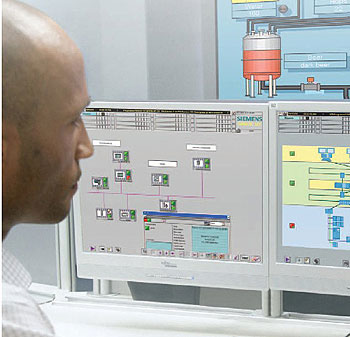
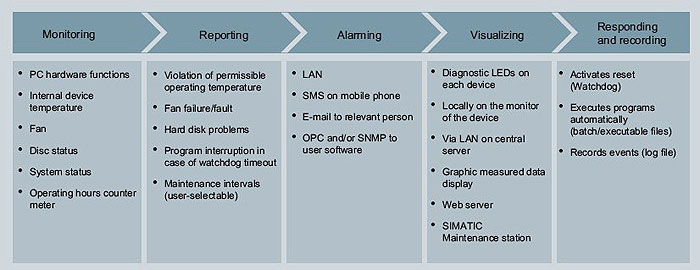
PAM systems provide timely information to help maintenance and operations improve asset availability, reducing the time required to maintain equipment and optimizing their efficiency. PAM systems rely on a combination of diagnostic software and hardware tools that perform automatic, real-time monitoring and alarming of asset-related key performance indicators. If something starts to fall out of acceptable parameters – such as a pump starting to vibrate more than it should – you are notified and can take predictive rather than preventative or corrective action. “Many people think PAM is a maintenance function, and it is that, but it’s also much, much more,” says Chuck Cotton, a spokesperson for Siemens Energy & Automation where he is deeply involved with the company’s PAM offering. “PAM enables you to squeeze a lot more blood out of your rocks.
“In addition to a higher return on assets,” he adds, “you can reduce the number of unscheduled stoppages, you can react more quickly when you do get a disruption that translates into a lower mean time to repair, you get decreased maintenance costs and ultimately improved productivity out of your plant and improved ROI from your assets.”
With many manufacturing operations freezing capital investments until the economy rebounds, it has never been more important to get more out of your existing investments, a contributing factor to remarkable market growth for PAM solutions.
According to Wil Chin, a research director who follows PAM at ARC Advisory Group in Dedham, Mass., the global market for PAM systems grew by an average of more than 13 percent a year since 2006, eclipsing the forecast of 10.8 percent.
“Today’s PAM systems offer end users a solution appropriate for both good and bad times,” says Chin, the primary author of the recent PAM study, Plant Asset Management Systems Worldwide Outlook. “The value proposition for PAM systems remains intact and – when combined with safety and other drivers associated with the decline in the workforce – PAM adoption will not fall off nearly as much as other automation investments.”
Chin believes that this resiliency is founded on PAM’s ability to help manufacturers do more with less. “By providing information at the right time and in the right context, workers work smarter.”
Despite this prediction, things are not necessarily all rosy for the PAM vendors.
“End users understand that PAM can help them to predictively diagnose the health of critical assets, but don’t always make the connection to how this can help improve profitability when resources are scarce and demand for their products is declining,” says Chin, who adds there is still a lot of confusion around PAM systems for end users and even where there is a clear understanding a deployment requires significant domain expertise. “Suppliers and end users need to educate themselves about the benefits that PAM systems offer to help them survive the economic contraction.”
That said, the impact can be profound.
In his book An Introduction to Predictive Maintenance, Keith Mobley claims that, depending upon the industry, maintenance costs can run anywhere from 15 to 60 percent of the cost of goods produced. He also suggests that up to a third of all maintenance expenditure is wasted because of poor or unnecessary maintenance. When he wrote this book in 2002, he estimated this translates to a loss of more than $60 billion per year in the United States.
“Predictive maintenance is really the ideal since it schedules specific tasks when they are actually required by the equipment rather than when someone estimates they will be required,” says Cotton. “Preventative maintenance, on the other hand, is about scheduling work whether it’s needed or not based on hours of operation or number of operating cycles. This leads to equipment being replaced while it still has some life left and pulls your skilled human assets off other more productive tasks.”
In the past, operations and maintenance teams have each had their roles to play in helping companies get the most out of their plants, but they have traditionally come at the problem separately. PAM brings them together, unifying and organizing their efforts.
“Traditionally, the maintenance organization was primarily concerned with asset availability, while operations was most concerned with asset utilization,” says Cotton. “These two functions are often at odds with each other. PAM enables you to manage both these factors in a holistic manner, which is more effective from a strategic business perspective. PAM systems provide the intelligence required to help you balance asset availability with asset utilization, helping you get the maximum possible productivity out of your plant.”
Getting started with a PAM strategy isn’t as complicated as it may seem. There is no need to launch into a plant-wide revolution right away, says Cotton. “Start with a criticality analysis. Look at what has the most impact on environment, production and safety. Start small, focus on a couple of projects, then expand, hopefully, to plant-wide strategy.”
At the core of any PAM strategy, adds Cotton, is integration. “It is important to integrate all the major components so they can be monitored and you can draw meaningful diagnostics from them. At Siemens, our Totally Integrated Automation approach delivers these elements – tying all the individual pieces together through networking then providing simple visualization and alarming through HMI tools, ultimately giving you more control over your operations.”
For further information on products within the Siemens Totally Integrated Automation approach, please click here.
Wouldn’t it be nice to know something was going to break before it actually brought your production line to a grinding halt, killing productivity, throwing off schedules and possibly compromising delivery deadlines? Now think about how nice it would be to be able to put that precognition to use and apply a little predictive maintenance to not only keep things running smoothly, but to keep them that way for longer before having to replace expensive equipment.
This is the promise made by Plant Asset Management (PAM) systems.
PAM systems provide timely information to help maintenance and operations improve asset availability, reducing the time required to maintain equipment and optimizing their efficiency. PAM systems rely on a combination of diagnostic software and hardware tools that perform automatic, real-time monitoring and alarming of asset-related key performance indicators. If something starts to fall out of acceptable parameters – such as a pump starting to vibrate more than it should – you are notified and can take predictive rather than preventative or corrective action. “Many people think PAM is a maintenance function, and it is that, but it’s also much, much more,” says Chuck Cotton, a spokesperson for Siemens Energy & Automation where he is deeply involved with the company’s PAM offering. “PAM enables you to squeeze a lot more blood out of your rocks.
“In addition to a higher return on assets,” he adds, “you can reduce the number of unscheduled stoppages, you can react more quickly when you do get a disruption that translates into a lower mean time to repair, you get decreased maintenance costs and ultimately improved productivity out of your plant and improved ROI from your assets.”
With many manufacturing operations freezing capital investments until the economy rebounds, it has never been more important to get more out of your existing investments, a contributing factor to remarkable market growth for PAM solutions.
According to Wil Chin, a research director who follows PAM at ARC Advisory Group in Dedham, Mass., the global market for PAM systems grew by an average of more than 13 percent a year since 2006, eclipsing the forecast of 10.8 percent.
“Today’s PAM systems offer end users a solution appropriate for both good and bad times,” says Chin, the primary author of the recent PAM study, Plant Asset Management Systems Worldwide Outlook. “The value proposition for PAM systems remains intact and – when combined with safety and other drivers associated with the decline in the workforce – PAM adoption will not fall off nearly as much as other automation investments.”
Chin believes that this resiliency is founded on PAM’s ability to help manufacturers do more with less. “By providing information at the right time and in the right context, workers work smarter.”
Despite this prediction, things are not necessarily all rosy for the PAM vendors.
“End users understand that PAM can help them to predictively diagnose the health of critical assets, but don’t always make the connection to how this can help improve profitability when resources are scarce and demand for their products is declining,” says Chin, who adds there is still a lot of confusion around PAM systems for end users and even where there is a clear understanding a deployment requires significant domain expertise. “Suppliers and end users need to educate themselves about the benefits that PAM systems offer to help them survive the economic contraction.”
That said, the impact can be profound.
In his book An Introduction to Predictive Maintenance, Keith Mobley claims that, depending upon the industry, maintenance costs can run anywhere from 15 to 60 percent of the cost of goods produced. He also suggests that up to a third of all maintenance expenditure is wasted because of poor or unnecessary maintenance. When he wrote this book in 2002, he estimated this translates to a loss of more than $60 billion per year in the United States.
“Predictive maintenance is really the ideal since it schedules specific tasks when they are actually required by the equipment rather than when someone estimates they will be required,” says Cotton. “Preventative maintenance, on the other hand, is about scheduling work whether it’s needed or not based on hours of operation or number of operating cycles. This leads to equipment being replaced while it still has some life left and pulls your skilled human assets off other more productive tasks.”
In the past, operations and maintenance teams have each had their roles to play in helping companies get the most out of their plants, but they have traditionally come at the problem separately. PAM brings them together, unifying and organizing their efforts.
“Traditionally, the maintenance organization was primarily concerned with asset availability, while operations was most concerned with asset utilization,” says Cotton. “These two functions are often at odds with each other. PAM enables you to manage both these factors in a holistic manner, which is more effective from a strategic business perspective. PAM systems provide the intelligence required to help you balance asset availability with asset utilization, helping you get the maximum possible productivity out of your plant.”
Getting started with a PAM strategy isn’t as complicated as it may seem. There is no need to launch into a plant-wide revolution right away, says Cotton. “Start with a criticality analysis. Look at what has the most impact on environment, production and safety. Start small, focus on a couple of projects, then expand, hopefully, to plant-wide strategy.”
At the core of any PAM strategy, adds Cotton, is integration. “It is important to integrate all the major components so they can be monitored and you can draw meaningful diagnostics from them. At Siemens, our Totally Integrated Automation approach delivers these elements – tying all the individual pieces together through networking then providing simple visualization and alarming through HMI tools, ultimately giving you more control over your operations.”
For further information on products within the Siemens Totally Integrated Automation approach, please click here.
50th Anniversary of Sinumerik
 When Siemens introduced Sinumerik in 1960 as the industry’s first numerical control (NC), customers immediately realized a dramatic improvement in their productivity and flexibility. These end user benefits helped put Siemens on the map and provided a foundation that helped vault the company to the pinnacle of the mechanical engineering industry. Now celebrating its 50th birthday, the latest evolution of Sinumerik still delivers customer value making it one of the longest serving brands in the world.
“Sinumerik has made Siemens the leader of technology and innovations in the CNC field for fifty years,” said Uwe Frank, CEO of Siemens Motion Control Systems. “It started with the first NC, then progressed through the CNC with a microprocessor to the first CNC-integrated safety solution. We’re continuing to invest specifically in research and development so that we can keep on writing this success story in the future.”
The first path control was developed on the basis of separate electronic components. Shortly thereafter, versions 200 and 300 delivered control for turning, milling, grinding and nibbling, and for electro-hydraulic drives. Sinumerik 500C, the first computerized numerical control (CNC), was introduced in 1973. Advances in microprocessor technology enabled Siemens to offer a DNC network for universal program management and transfer for the first time in the mid 1970s. Sinumerik System 8 appeared three years later, a CNC with multi-channel capability and an integrated programmable logic controller (PLC). This innovation made the device suitable for drilling and nibbling machines in addition to turning and milling.
Meanwhile, Sinumerik was also getting smaller with Sinumerik Primo – a compact CNC, no bigger than a shoebox. Application-specific operator interfaces and graphic programming functions were introduced in the early 1980s and by the middle of the decade the principle of “openness” determined the design of subsequent CNC generations with machine manufacturers designing their own interfaces and adding their own images and menu trees. In the mid 90’s Sinumerik 840D, a CNC for the high-end of the performance range, introduced a digital drive link and an open NC kernel, which enabled the integration of software components and safety became a factor, with the launch of Sinumerik Safety Integrated, the first CNC-integrated safety solution. The years that followed saw the introduction of workshop-oriented graphical programming interfaces and the expansion of the Sinumerik family to include web-based condition monitoring and mechatronic support for machine simulation and virtual prototyping.
In 2005, Siemens presented the Sinumerik 840D sl, an open and innovative CNC for up to 31 axes, and the Sinumerik 802D sl, for turning and milling machines in the lower and mid performance ranges. Following that, Siemens expanded Sinumerik to deliver workpiece machining solutions for the entire CAD/CAM/CNC process chain. At the 2009 EMO trade show for machine tools, Siemens exhibited the compact Sinumerik 828D CNC as a solution for the JobShop market, Sinumerik Operate HMI as a standardized CNC HMI platform, and also the Sinumerik MDynamics technology package for high-speed / high-accuracy milling applications.
Today, customers use Sinumerik to network all areas of their production operation in order to exchange data between the development and design departments right through to actual manufacture on the CNC machines. Modular and scalable, contemporary Sinumerik automation systems incorporate multiple products for machine tools to continue to bring innovation and efficiencies to end user applications, whether deployed for use in standardized turning and milling machines, as a powerful drive-based CNC controller system, or as a PC-based solution.
“The evolution of Sinumerik really reads like the evolution of the industry, beginning with what we see today as somewhat simplistic capabilities and growing into today’s highly customizable, fully integrated open-architectures,” added Frank.
For more information on Sinumerik, please click here.
Repost: Omron PLC for Beginner

Bagi anda yang ingin belajar PLC Omron, ini saya dapet buku sangat bagus untuk di praktek kan. Banyak contoh aplikasi program dalam buku ini. Bagi yang berminat silahkan download.
Untuk Download silahkan KLIK DISINI!
Untuk Melihat Isi dari buku ini silahkan klik:
Content 1.
Content 2.
Content 3.
Mau?
Semoga bermanfaat.
Wednesday, July 28, 2010
Wireless Integration Ensures Wastewater Plant Reaches Its Upgrade Goals
 Upgrading the control system for a municipal wastewater system was going to be costly and time consuming until facilities engineers reviewed available wireless technologies. The Persigo Waste Water Treatment Plant serves the City of Grand Junction, Colo., and the surrounding communities. The facility, which cost about $28 million, was put into service on Jan. 16, 1984.
After two decades of operation, the existing control infrastructure was in need of replacement and upgrade. Although, it originally had been designed to use the most reliable communications signaling technology available at the time, buried multi-conductor copper cables, age and constant use had heavily degraded the performance. As a result, maintaining the system became expensive.
Ed Tankersley, Lead Plant Mechanic, summed up the situation at the time: “Our wires underground were failing; therefore we were trying to get our plant-wide SCADA system running so everything in the plant would come back via wireless Ethernet. However, we had a relatively primitive communications system.”
Additionally, Tankersley realized, the entire system could be made more reliable, easier to maintain and more energy efficient if the controls for the dozens of pumps, blowers, valves and sensors were upgraded to take advantage of the latest Totally Integrated Automation (TIA) technology from Siemens Industry, Inc. The system Persigo now employs has two types of wireless data communications and a full complement of TIA-based controllers, HMIs and SCADA software.
To plan the system upgrade, Tankersley contacted Cody Lange at automation-technology distributor Crum Electric for help. “Ed’s vision was that he and his staff in the plant would have all the knowledge needed to not only integrate the system, but also to carry out maintenance into the future,” Lange recalls. “He wanted to have the knowledge to repair and improve the plant internally without having to call in external people or [reach out to third parties for] support.”
“My part,” Lange continues, “was primarily to help with the architecture and [provide information about] different types of I/O and processors available in the TIA portfolio. I also provided technical support as far as programming and Ed worked with Siemens’s Technical Support Hotline.”
The system Tankersley designed with Lange’s assistance relies on wireless networking throughout. For communication within the Persigo facility itself, where communications links span distances of a few hundred yards at most, they opted for a Siemens Scalance W Wireless Ethernet network. To communicate with control systems at the lift pumps miles away, they chose FHSS radio technology from wireless system developer FreeWave.
They simplified and upgraded the control architecture by adopting Siemens Totally Integrated Automation (TIA) technology. TIA is a networked control system philosophy that stresses harmonization and integration of all control-system components to reduce installation costs, with integrated diagnostics to make the installed system as easy to maintain as possible. The TIA system maximizes re-use of software components, and provides hardware components designed to work together seamlessly.
For example, Siemens S7-200 PLCs are used for small local-control systems, such as lift pumps, while Siemens S7-300 PLCs control larger, more complex equipment in the main facility. Siemens Simocode intelligent motor overloads were used on critical motor loads such as the three 300HP blowers, and Siemens WinCC SCADA (Supervisory Control and Data Acquisition) visualization software was used for plant monitoring and operation. WinCC also acts as an OPC server to Canary Labs Trend Link, logging any process variable every quarter second. This enabled Tankersley to use Siemens Simatic Manager software to program the entire plant.
Huge Service Area
Robust long-range control communications are crucial in wastewater treatment facilities because these facilities generally serve a large geographic area, and their processing facilities tend to be spread out as well. Persigo’s service area currently contains 488.8 miles of sanitary sewer lines, and this increases each year with the continued growth in the Grand Junction area. In addition, three Sanitation Districts send sewage to Persigo WWTP for treatment, including: Central Grand Valley Sanitation District (78.6 miles), Orchard Mesa Sanitation District (34.3 miles ), and Fruitvale Sanitation District (29.9 miles).
As one would expect, the wastewater flow channels to the plant resemble tributaries draining a river-system watershed. The communications-network physical topology mimics the wastewater collection system’s topology. The network is a modified star configuration (in information network parlance). Of particular interest is control communications for the network’s lift stations.
Gravity drives wastewater flow through most of Persigo’s collection system, but some parts of the system require additional pressure boosts to pass obstacles, such as hills and valleys. Hence the need for lift stations, which are automated pumps providing the additional boost on an as-needed basis.
At each lift station Persigo is using a Siemens S7-200 PLC with a Freewave FGR2 RS 485 radio for communications. Some of the closer lift stations not only provide their own data back to the plant, but also repeat data from lift stations further away.
“Our farthest jump is 20 plus miles,” Tankersley says. “The radios’ maximum range depends on how much you want to spend on antennas and, of course, line of sight. They are only one watt, but I imagine you could get 30 miles in this terrain if you selected more powerful antennas.”

Advanced Technology
“One of the primary reasons they wanted to use wireless was because this is a very old plant,” Lange recalls, “and it is uneconomical to run copper wire out to all the locations. So wireless was really the preferred solution because it saved time, money, and effort, and eliminated the need to trench and get into the vaults.”In addition, it is generally not good practice to run control and communications wiring in the same vaults as the 13,200VAC power cables. The communications signals can be disrupted by the electromagnetic fields produced by the power cables.
Tankersley says he considered a number of alternatives before deciding on this system: “At the very, very expensive end, you could run fiber, which is not practical. You could also run via satellite, which is another wireless technology, but requires monthly fees. Years ago we had a phone line to each station, but the monthly fees were killing us. You could also run cell phones at each station, but again you have a monthly fee.”
In the end, he chose to use Siemens’ Scalance Ethernet infrastructure, which is a combination of managed and unmanaged switches, and wireless and hard-wired switching. The system also includes multiple Siemens HMI panels and a WinCC Flexible runtime on a PC in the main operations building. This connects to the system’s data logging functions, and everything networks to an alarm dialing system.
One of Tankersley’s goals was to set the system up so that operators could access any process from any HMI panel in the entire plant or from the PC operator’s station in the main building. If, for example, an operator is in the digester building, he or she can look at the headworks, or the aeration basin, or vice-versa.
This is a huge advantage, particularly in the headworks building where all the sewage comes into the plant. “That’s not a place you want to spend a lot of time,” Tankersley says. To be able to look at the operations in that building from another location that is a little more pleasant was a key deciding factor. To not have to walk several hundred yards when diagnosing a plant issue, or to avoid going into an unpleasant environment to access data and control those stations, is more than convenient. It makes maintaining the plant much more efficient.
System Within a System
“Lift stations include a pump and a redundant pump,” Persigo’s Tankersley points out. Sometimes there’s a dry well for the pumps and a wet well next to it. Other times pumps are surface mounted, and then they have to vacuum pump the sewage into the pump to prime it. The bigger ones do have backup generators. Our biggest station has two 60 horsepower (HP) pumps, and the smallest stations have 2 HP pumps.”
Pump stations are automated by small, low I/O count control systems that run autonomously. Each pump station has a 24-V-powered S7-200 Siemens PLC as the controller. Each pump station also has a Freewave 900 MHz frequency-hopping spread-spectrum radio to communicate back to the main facility either directly or through repeaters (additional FHSS radios) via the Modbus communication protocol to a Siemens S7-200 at the main plant site.
The S7-200 is a data concentrator that brings everything into a second PC running Siemens’ Simatic NET OPC server. The OPC client is Win911, which is a commercial auto-dialer software that calls a phone list and relays messages to plant operators and maintenance staff for help based on alarm conditions.
Under normal circumstances each lift station runs autonomously, but they all report departures from normal operation, such as high wet-well level or power failures, back to the main facility. For example, some of the stations have backup generators. If the power fails, the generator starts up automatically. When the backup generator successfully starts, the power fail condition clears, but the original power-failure problem may still need attention. If nobody fixes it and resets the generator within a given time, the controller will call with a generator running alarm.
“At the main plant site, we are running S7-300 PLCs, which are much more powerful than the S7-200s in the lift stations,” Tankersley says. Additional equipment used in the main facility includes 8” HMI color touch panels, and 19” touch panel HMIs. All remote PLCs automating processes scattered throughout the plant have Siemens Scalance 788-1 PRO radios communicating with the main operations console via wireless Ethernet (WiFi) in the operations building.
There are two PCs in the operations building. One runs Win911 and the other is the WinCC Flexible HMI to supervise all plant processes. That second PC also data logs all plant processes, archiving the data. Because the system is stand alone, all PLCs, HMIs and PCs are synchronized to the exact time through a GPS time server.
Altogether, the system upgrade and wireless network have been successful. The new communications are much more reliable, while the new automation equipment proved simpler to install and easier to maintain than the old equipment. The staff at Persigo can now respond much more quickly to alarms at any of their locations, local or remote, and with more diagnostic information. This cuts down on their travel time for troubleshooting with most initial diagnosis able to be done remotely, eliminating wasted efforts for nuisance alarms. The new Siemens TIA based system provides an architecture that is compatible for easy future expansion, protecting the investment by Persigo and ensuring future sustainability.
Persigo Waste Water Treatment Plant at a Glance
The treatment process at the Persigo Waste Water Treatment Plant includes four steps:
1. Preliminary Treatment
2. Primary Clarifiers and Activated Sludge
3. Final Effluent
4. Sludge Processing
Design capacity for the plant is 12.5 million gallons per day of wastewater generated at homes, schools, churches, and industries, anyplace that is tied into the sewer system. The wastewater travels to the treatment facility through 462 miles of pipelines. Average flow is 8.0 million gallons/day (30,283 m3/day). It takes about 14 hours for the water to go through the entire plant. In the main facility, there are five sewage lift pumps of 100 horsepower with a capacity of 6,950 gallons/min (10 million gallons/day) each.
Solar Panel Assembly Made Easy
Precision manufacturing is key to producing weather-resistant solar panels. Integrated motion and control systems from Siemens provide the needed accuracy and performance.
A market growing at 45 percent per year looks like a good bet to get into. According to Mike Taylor, director of research and education, Solar Electric Power Association, the solar photovoltaic for electric generation market has been on that slope for the past three years. No wonder automation companies are developing solutions for the solar panel market.
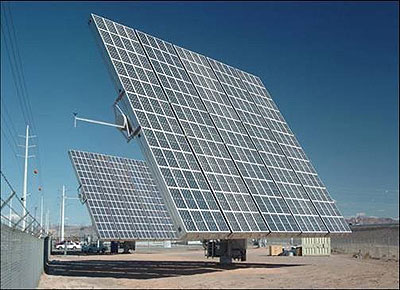
Taylor says that Europe has been the photovoltaic leader, but that the U.S. market is rapidly developing. Putting to rest the myth that solar implementations require never-ending sun, the current market leader is Germany—not exactly a sunny country. Spain follows, with the United States third in market size.
“In the United States, we just broke the 300 megawatt (MW) barrier in photovoltaic electric generation in 2008. By comparison, in 2007 the total was 160 MW and in 2006 it was not quite 100 MW,” says Taylor. “With the entry of utilities and big box commercial stores into the (solar energy use) market, it’s just going to keep growing.”
Siemens has been involved in the solar industry for many years and has honed its automation offering to fit the needs of solar panel manufacturers. Apparently simple from the outside, these panels are multiple layers of materials that must be precisely sized, cut, stacked and sealed. If dirt, dust or contaminants land on any of these layers before the unit is laminated, it more than likely will affect the performance of the solar panel. The assembly process must assure the final product is impervious to weather and other outdoor environmental hazards.
Complex manufacturing
The manufacturing process includes accurately measuring, cutting, transporting, positioning and stacking insulation, protective film and other layers of proprietary films onto expensive and fragile sheets of photovoltaic silicone without contaminating any of the layers. If the silicone layer is dropped, bumped or hit with too much force, the sheets can crack or break into shards. The films come from rolls and are cut to length and registered to position onto the substrate. The end result is a hermetically sealed panel that converts solar energy into electricity for residential or commercial use.
A company located near Chicago specializes in building machinery to manufacture these panels. A Siemens 317T programmable logic controller
“This was a new project for this customer,” says Ken Brey, technical director for DMC Inc., an automation engineering and software services company located in Chicago. “This customer requested Siemens equipment to match the rest of their automation equipment. They know that Siemens equipment would not only give them continuity in the hardware and software, but would also give them the high level of performance and operation they expected. They also know from experience that Siemens service is much easier to get globally than other brands.”
(PLC) controls the process. This PLC employs CPU 317T-2 DP technology which adds powerful motion control functions to the existing range of standard central processing units (CPUs). These motion control functions are integrated in the CPU firmware and are supported by a co-processor for high-speed closed-loop control. This ensures that the performance of the CPU 317 for normal control tasks is maintained and that the motion control functions can be computed at a higher clock rate.
Like making a sandwich

As Brey explains it, the process of making these panels is similar to making a sandwich. Instead of bread, glass panels make up the first layer. Instead of meat or cheese, EVA and insulation material make up the second layer. The solar panels get placed into the sandwich and are put into a laminator to seal everything together.
“Our customer’s machines cut and place the middle layers onto a vacuum conveyor. The machine positions the panel under the leading edge of the EVA and feeds the panel and the EVA together to build our “sandwich.” The laminating process is done with another company’s equipment,” states Brey. “The end customer was building an entire factory from scratch with equipment from different vendors. Standardizing on Siemens was the quickest and easiest way for the equipment to communicate as well as ensuring the job met the customer’s high expectations,” according to Brey.
A typical motion control application like this assembly process needs to control 2 to 8 axes. The Siemens 317T PLC can control up to 16 axes. In addition to accurate single axis positioning, the technology CPU is particularly suited for complex, synchronized motion sequences, such as coupling with a virtual or real master, geared synchronous motion, electronic cam discs and print mark correction. Print mark registration is particularly important in the solar panel lamination process so film is properly aligned onto the photovoltaic cells. Using Siemens STEP 7 software, only one program is needed for PLC and motion control, making configuration and programming significantly easier and faster.
The processor in the solar panel assembly machine has motion control functions integrated into the CPU that guide four servo axes to position the film. It allows the process to run at high speeds without a separate motion controller. Accurate registration of the film is achieved using the built-in geared synchronous motion and measuring probe functions of the 317T PLC. Siemens solution provider, DMC, Inc., installed the control system at the manufacturer’s facility near Chicago and the machine now resides in the photovoltaic panel plant in Europe.
SEPA’s Taylor has calculated from public announcements of utilities that 2,500 MW of electric generation from photovoltaic panels is projected for manufacture in the next five years. With utilities and large commercial enterprises such as Wal-Mart looking at adding solar generating equipment, the demand for these Siemens controlled assembly machines should be sky high.
For more information on Siemens Solar Industry Solutions, please click here.
A market growing at 45 percent per year looks like a good bet to get into. According to Mike Taylor, director of research and education, Solar Electric Power Association, the solar photovoltaic for electric generation market has been on that slope for the past three years. No wonder automation companies are developing solutions for the solar panel market.
Taylor says that Europe has been the photovoltaic leader, but that the U.S. market is rapidly developing. Putting to rest the myth that solar implementations require never-ending sun, the current market leader is Germany—not exactly a sunny country. Spain follows, with the United States third in market size.
“In the United States, we just broke the 300 megawatt (MW) barrier in photovoltaic electric generation in 2008. By comparison, in 2007 the total was 160 MW and in 2006 it was not quite 100 MW,” says Taylor. “With the entry of utilities and big box commercial stores into the (solar energy use) market, it’s just going to keep growing.”
Siemens has been involved in the solar industry for many years and has honed its automation offering to fit the needs of solar panel manufacturers. Apparently simple from the outside, these panels are multiple layers of materials that must be precisely sized, cut, stacked and sealed. If dirt, dust or contaminants land on any of these layers before the unit is laminated, it more than likely will affect the performance of the solar panel. The assembly process must assure the final product is impervious to weather and other outdoor environmental hazards.
Complex manufacturing
The manufacturing process includes accurately measuring, cutting, transporting, positioning and stacking insulation, protective film and other layers of proprietary films onto expensive and fragile sheets of photovoltaic silicone without contaminating any of the layers. If the silicone layer is dropped, bumped or hit with too much force, the sheets can crack or break into shards. The films come from rolls and are cut to length and registered to position onto the substrate. The end result is a hermetically sealed panel that converts solar energy into electricity for residential or commercial use.
A company located near Chicago specializes in building machinery to manufacture these panels. A Siemens 317T programmable logic controller
“This was a new project for this customer,” says Ken Brey, technical director for DMC Inc., an automation engineering and software services company located in Chicago. “This customer requested Siemens equipment to match the rest of their automation equipment. They know that Siemens equipment would not only give them continuity in the hardware and software, but would also give them the high level of performance and operation they expected. They also know from experience that Siemens service is much easier to get globally than other brands.”
(PLC) controls the process. This PLC employs CPU 317T-2 DP technology which adds powerful motion control functions to the existing range of standard central processing units (CPUs). These motion control functions are integrated in the CPU firmware and are supported by a co-processor for high-speed closed-loop control. This ensures that the performance of the CPU 317 for normal control tasks is maintained and that the motion control functions can be computed at a higher clock rate.
Like making a sandwich
As Brey explains it, the process of making these panels is similar to making a sandwich. Instead of bread, glass panels make up the first layer. Instead of meat or cheese, EVA and insulation material make up the second layer. The solar panels get placed into the sandwich and are put into a laminator to seal everything together.
“Our customer’s machines cut and place the middle layers onto a vacuum conveyor. The machine positions the panel under the leading edge of the EVA and feeds the panel and the EVA together to build our “sandwich.” The laminating process is done with another company’s equipment,” states Brey. “The end customer was building an entire factory from scratch with equipment from different vendors. Standardizing on Siemens was the quickest and easiest way for the equipment to communicate as well as ensuring the job met the customer’s high expectations,” according to Brey.
A typical motion control application like this assembly process needs to control 2 to 8 axes. The Siemens 317T PLC can control up to 16 axes. In addition to accurate single axis positioning, the technology CPU is particularly suited for complex, synchronized motion sequences, such as coupling with a virtual or real master, geared synchronous motion, electronic cam discs and print mark correction. Print mark registration is particularly important in the solar panel lamination process so film is properly aligned onto the photovoltaic cells. Using Siemens STEP 7 software, only one program is needed for PLC and motion control, making configuration and programming significantly easier and faster.
The processor in the solar panel assembly machine has motion control functions integrated into the CPU that guide four servo axes to position the film. It allows the process to run at high speeds without a separate motion controller. Accurate registration of the film is achieved using the built-in geared synchronous motion and measuring probe functions of the 317T PLC. Siemens solution provider, DMC, Inc., installed the control system at the manufacturer’s facility near Chicago and the machine now resides in the photovoltaic panel plant in Europe.
SEPA’s Taylor has calculated from public announcements of utilities that 2,500 MW of electric generation from photovoltaic panels is projected for manufacture in the next five years. With utilities and large commercial enterprises such as Wal-Mart looking at adding solar generating equipment, the demand for these Siemens controlled assembly machines should be sky high.
For more information on Siemens Solar Industry Solutions, please click here.
LOGO! AM2 RTD Module Simplifies Setup

The latest LOGO! AM2 RTD module makes it simpler for users to add a range of sensors. The new module provides improvements that include support of PT100 and PT1000 sensors while also letting users mix either PT100 temperature sensors or PT1000 Flue gas temperature sensors.
The LOGO! AM2 RTD is fully compatible with the existing products (LOGO! 24, LOGO24o and AM2 PT100) and will replace the predecessor products. The line simplifies setup: when new sensor types are connected, the modules provide automatic identification of the connected sensor when the expansion module starts up.
LOGO! modular is available in various versions for a variety of supply voltages (12 V DC, 24 V DC, 24 V AC, 115/230 V DC, 115/230 V AC), offering distinctive features such as R: Relay output and C: Clock/time switch. Some LOGO! Versions include operator keypad and display panel in one unit, streamlining system design. Up to 36 different functions can be connected at the click of a button or by means of PC software.
For more information on the LOGO! AM2 RTD, please click here.


