No Copy


No Right Click

Selamat Datang di Situs Belajar PLC dan SCADA

Blog gratis yang menyajikan berita seputar PLC dan SCADA.

Microsoft Windows 10

Berita seputar Microsoft Windows 10. Membahas berbagai informasi mengenai Microsoft windows terbaru.

Apple OSX

Artikel yang membahas tentang OSX terbaru dari Apple tentu sangat menarik untuk dibaca. Tak kalah serunya jika kita paham mengenai tips dan trik yang ada didalamnya.

Photography

Photography asik dan menarik jika kita mengetahuinya lebih dalam. Disini kita bisa melihat berbagai hal dari sudut pandang photo. Menarik untuk dipahami.

Showing posts with label Siemens Automation. Show all posts

Wednesday, November 23, 2016

PLC Programming Tutorial for Beginners

In this lesson we will learn how to write a PLC program using an "S7 300” PLC and “STEP 7” software.
We have two pumps which are being used to transfer two separate liquids into this tank.Inside the tank there are two level switches installed in the lower and upper parts of the tank respectively.

There is also an electrically powered mixer inside the tank which starts working for a defined period of time, mixing the two liquids together after the tank has filled.
We also have a discharge valve in the bottom of the tank which controls the draining of the liquid from the tank.
When the level of the liquid drops to the level of the switch's position the contact closes, sending a 24 volt DC signal to the PLC input.

We want to write the program so that when the level of the liquid reaches this minimum, the pumps will be activated and begin filling the tank with the liquids. 
The pumps continue filling the tank until the level reaches its maximum at the higher level switch. When this happens the open contacts in the switch will be closed and another 24 volt signal will be sent to the PLC input telling us that the tank is full. 

When this signal has been sent, first the pumps should shut down so that no more liquid enters the tank, and then this mixer should be turned on.

We want the mixer to operate for seven seconds, mixing the liquids that have been pumped into the tank.
After seven seconds the mixer should automatically shut down and this discharge valve should open.
With the valve open the liquid will be discharged from the tank and transferred to another location within the factory to be processed.

When the level of the liquid in the tank drops to the minimum set level of the lower switch, the switch contacts will close again thus starting a repeat of the cycle!


This is the third video of “star-delta starter PLC program and wiring video series”. In this video you’re going to learn the wiring of star-delta starter. 
The basic concept of star-delta starter is to first run the motor in the star connection for a few seconds to reduce the start current. Then when the motor has gained sufficient speed, change the winding connections to delta. 

PLC Training_Star-Delta Starter PLC program and Wiring_ Part 1:
https://youtu.be/skcaCBxyNSk

PLC Training_ Star-Delta Starter PLC Program and Wiring_Part 2:
http://youtu.be/FOKSkCR6JQY

PLC Training_ Star-Delta Starter PLC Program and Wiring_Part 3:
https://youtu.be/aEkQuqEdlVA

PLC Training_ Star-Delta Starter PLC Program and Wiring_Part 4:
https://youtu.be/SOZwFUzTQsU

PLC Training_ Star-Delta Starter PLC Program and Wiring_Part 5:
https://youtu.be/qA3Yg5CS-F8

PLC Training_ Star-Delta Starter PLC Program and Wiring_Part 6:
https://youtu.be/J9RMP8l3vDA

PLC Training_ Star-Delta Starter PLC Program and Wiring_Part 7:
https://youtu.be/0q-CDJinDVw

PLC Training_ Star-Delta Starter PLC Program and Wiring_Part 8:
https://youtu.be/nqlEK_ERTxk

PLC Training_ Star-Delta Starter PLC Program and Wiring_Part 9:
https://youtu.be/fiPSMyFIiFY

Siemens PLC - What exactly is Profibus-DP in layman's terms?

Today Profibus-DP is one of the most commonly used networks in industrial automation. Profibus stands for “Process Field Bus” and “DP” sands for “Decentralized Peripherals”. In this video we’re going to learn all about Profibus-DP and what exactly it decentralizes.

Using Profibus-DP, instead of wiring each individual sensor, actuator or other facility to the PLC individually, we can install a set of “remote I/Os” next to these facilities in the field area and then transfer the data to the control area using a single RS-485 cable. This can decrease the cost of wiring dramatically and on the top of that, since the data transmission method here is “digital”, industrial environment noise has less of an impact on data, so data communication between the control and field areas will be more robust.


Saturday, November 12, 2016

Siemens TIA Portal

Divisi Industri Otomatisasi dari Siemens saat ini memperkenalkan Totally Integrated Automation Portal (TIA Portal) – software otomatisasi pertama dengan Engineering Environment dan Software project terpadu. Software ini memudahkan para penggunanya untuk melakukan pengembangan dan komisioning terhadap sistem otomatisasi secara cepat dan intuitif, yang memberikan efisiensi lebih terhadap waktu dan biaya yang diakibatkan oleh adanya berbagai macam software dalam melakukan integrasi. Didesain sedemikian rupa untuk efisiensi tinggi dan penggunaan yang mudah, TIA Portal telah disesuaikan untuk para pemula dan professional. Untuk selanjutnya TIA Portal ini merupakan dasar utama dari semua paket software engineering di kemudian hari untuk konfigurasi, pemrograman dan komisioning produk perangkat otomatisasi yang ada dalam portofolio produk Totally Integrated Automation dari Siemens. Sebagai contoh adalah New Simatic Step 7 V11 automation software untuk Simatic PLC dan Simatic WinCC V11 untuk Simatic HMI (Human machine Interface) dan aplikasi visualisasi.
Desain dari TIA Portal ini, Siemens telah mempelajari banyak aplikasi software engineering yang ada beberapa tahun ini serta mengamati dan melakukan evaluasi terhadap kebutuhan para penggunanya di seluruh dunia. Sebagai komponen dari perangkat engineering software Siemens, TIA Portal memberikan shared services yang lebih maju antar configuration interfaces yang menjamin keseragaman navigasi kepada para penggunanya serta sistem yang konsisten. Sebagai contoh, semua perangkat dan jaringan di dalam system automasi sekarang ini dapat dikonfigurasikan melalui satu perangkat dan editor jaringan. Project navigation, library concepts, data management, project storage, diagnostics dan online function merupakan layanan standard yang tersedia untuk para pengguna TIA Portal ini. Software development environment gabungan ini menawarkan tingkat efisiensi yang tinggi di seluruh project automation yang di dalamnya terdapat programmable controllers, HMI devices dan Drives. Sebagai tambahan, semua data management untuk parameter-parameter pada controller, block-block, tag-tag atau messages ini hanya memerlukan sekali input – sangat menghemat waktu dan biaya software engineering dari project itu sendiri. TIA Portal ini didesain berdasarkan advanced object-oriented software architecture serta data management yg terpusat, yang memberikan konsistensi data yang berkesinambungan secara otomatis untuk menghindari error pada data entry. Para pengguna dapat dengan mudah menemukan data yang diinginkan dan program blocks dari seluruh automation project menggunakan project-wide cross-reference system, yang dapat mengurangi waktu troubleshooting dan debugging program program project yang ada.
Aplikasi terpadu yang baru ini memungkinkan semua Programmable Controller Siemens, HMI operator panel dan drives dikonfigurasikan melalui satu environment development yang sama. Kelebihan ini dapat menurunkan biaya interfacing serta konfigurasi pada layanan-layanan yang biasa dilakukan ketika pengaturan komunikasi antar controllers, drives dan HMI devices. Sebagai contoh, pengguna hanya perlu melakukan drags and drops sebuah tag yang ada di dalam PLC, seperti sinyal dari modul I/O ke dalam tampilan HMI. Tag tersebut secara otomatis terbentuk di dalam HMI dan koneksi antara controller dengan HMI akan ter-create secara otomatis tanpa diperlukan konfigurasi manual.
Engineering software Simatic Step 7 V11 pada TIA Portal, dapat mendukung PLC Siemens seperti Simatic S7-1200 controllers, Simatic S7-300 dan Simatic S7 400 controllers serta PC-based automation system Simatic WinAC. Dengan cakupan programmable controllers yang luas memungkinkan Simatic S7 V11 untuk memenuhi tuntutan kinerja dan kemampuan yang menyeluruh dari sebuah software engineering untuk automation system. Kelebihannya adalah pemindahan konfigurasi yang ada di dalam Simatic Controllers dan HMI devices ke dalam project software baru hanya memerlukan waktu yang cukup singkat sehingga dapat menghemat waktu dan biaya untuk proses migrasi.
Simatic WinCC V11 yang baru ini juga berpatokan pada TIA Portal yang termasuk di antaranya konfigurasi machine-level application yg menggunakan HMI operator panels yang mendukung model panel Simatic TP dan MP, Simatic HMI Comfort Panel dan PC-based SCADA (Supervisory Control and Data Acquisition) process visualization system. Konfigurasi dan commissioning untuk Sinamics inverter drive nantinya juga akan dikembangkan di dalam TIA portal ini. (kpl/sie/roc)

Migration Guide: SIMATIC S7-300/400 to SIMATIC S7-1500

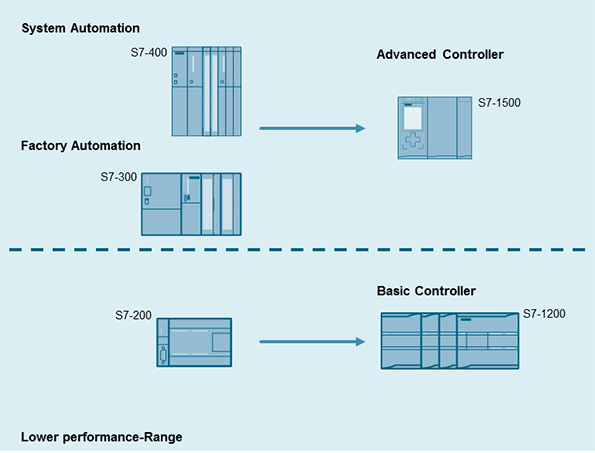
This migration guide contains recommendations and notes for users who are currently using SIMATIC S7-300/400 automation systems and plan to migrate to the new SIMATIC controller generation S7-1500.


The new controller generation SIMATIC S7-1500 has an up-to-date system architecture and, together with TIA Portal, offers new and efficient programming and configuration options. To be able to use these advantages, it is important that users who are currently using SIMATIC S7-300/S7-400 automation systems and plan to migrate to the new SIMATIC controller generation SIMATIC S7-1500, develop a detailed comprehensive concept for planning and implementing the pending migration. This requires thorough clarification in the run-up to migration.

Figure 1
  

The objective of this document is to support plant migration to a modern controller generation and cover the most important questions that may arise in this context. This document contains recommendations and notes for this migration.
This document covers the following key issues relating to plant migration from S7-300/S7-400 to S7-1500:

  • Planning a plant migration
  • System architecture S7-300/S7-400 and S7-1500
  • Hardware migration
  • Software conversion
  • Overview of the most important recommendations
  • Comparison of SIMATIC S7-300/S7-400 and S7-500 components

NoteThis document is not valid with SIMATIC S7-400 in combination with PCS 7.


Friday, November 13, 2015

Simatic ET 200SP CPU / ET 200SP Open Controller

Compact controllers for distributed applications

The new Simatic ET 200SP CPU Distributed Controller is a modular distributed controller that is compact and flexible. Thanks to its compact design, it requires little space in the control cabinet. Because it has the same storage systems, volumes, and features as the Simatic S7-1511 and S7-1513 CPUs, customer programs with varying design types can be used. Three Industrial Ethernet ports with variable bus adapters (RJ45, FC, SCRJ) have been integrated for flexible bus connection. Option handling in the central configuration also makes it possible to flexibly retrofit options without engineering effort. 

Source from: siemens.com

The distributed controller series is rounded off with the first 1510SP F CPU and 1512SP F CPU for modular and failsafe automation. This makes it possible to implement standard and failsafe applications using one controller in the ET 200SP. Another benefit is its high investment protection, because once a user program has been developed, TIA Portal makes it possible to easily port the program to both Simatic S7-1200 and Simatic S7-1500 controllers. The compact Simatic ET 200SP Open Controller is another addition to the modular distributed controller series and is particularly suited for series machine manufacturing. It is the first controller of this type to combine the functions of a PC-based Software Controller with visualization, Windows applications, and centralized I/Os in a single compact device. 

This means that users need to stock fewer spare parts, and evaluation and maintenance efforts are also significantly reduced. The Open Controller can be flexibly expanded with standard ET 200SP modules and can be optimized for series machines and machines with a distributed structure. Because it has a compact design, it requires little space in the control cabinet. It is also fully compatible with ET 200SP CPU projects, so various performance requirements can be met without additional effort. siemens.com/distributed-controller siemens.com/open-controller.

New Feature

• ET 200SP Open Controller: powerful all-in-one device with small footprint on the DIN rail 
• Very compact system with minimum space requirements in the control cabinet
• Modular expansion of functions with all ET 200SP modules 
• Complete engineering in TIA Portal for increased productivity with reduced engineering effort
• Failsafe CPUs 1510SP F and 1512SP F

Thursday, April 23, 2015

PLC Analog IO Troubleshooting Tips

When commissioning or troubleshooting PLC inputs and outputs (IO), the analog signals are often the most difficult.  First, analog IO almost always has to be scaled to convert the raw signal to useful process values.  Also, there are many wiring and external device (sensor/actuator) configurations.
Here are some simple guidelines for troubleshooting and working with Analog IO.  Although these guidelines are intended to help you think about the process of troubleshooting, this process will surely catch any specific issues you encounter.

Inside the PLC:
1. Ensure the IO channels are properly configured
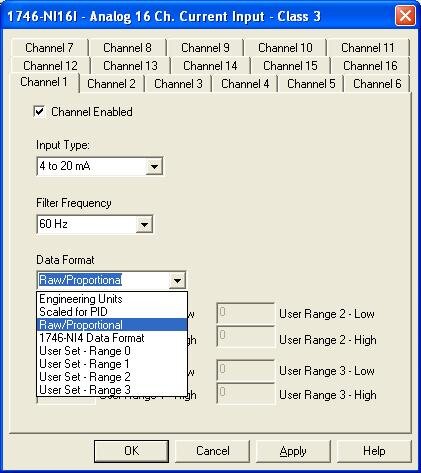
Most PLCs try to make it easy to configure analog IO hardware.  There are often selection boxes for the many signal types:  Voltage / current / resistance.   4 wire / 2 wire.  In the Allen Bradley RSLogix500 IO configuration at #3 below, for example, you can select an input type for each channel.
Double-check your analog IO channel settings and make sure they match the sensor or actuator wired to that channel.  As described in step 2 above, these may be configurable settings, or they may be fixed values.  Either way, they must match your PLC configuration.
2. Make sure the raw values are within range
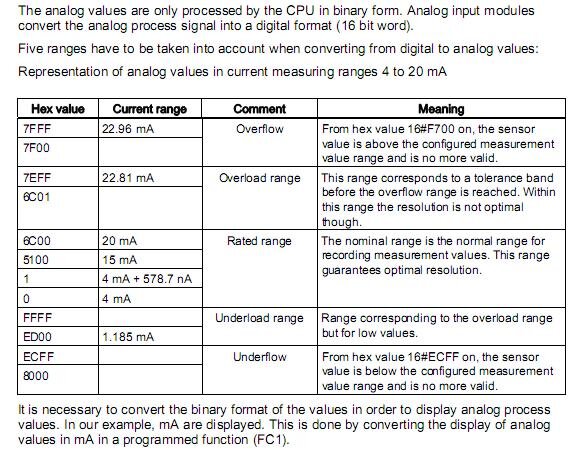
All analog IO modules have defined ranges for raw IO values.  For example, the Siemens SM331 analog module manual has the following range definitions listed for a 4-20mA input:
 
Most PLCs have a way to monitor the raw input values.  For the Siemens example above, if you see that the raw hex input value is outside the rated range, then there is a problem with the analog signal to the PLC, and thus the problem lies with the wiring or the sensor itself.

3. Check PLC scaling
Analog input and output scaling can occur both at the IO module configuration and inside the PLC logic program.  Check both locations to make sure the PLC value is not accidentally being scaled twice.  We generally recommend scaling within the PLC program instead of in the IO module configuration so the math is obvious and visible at one location.
In the Allen Bradley RSLogix500 IO configuration below, for example, you can select between the different data formats, which include automatic or user-defined scaling.

Outside the PLC:
1. Check all wiring connections
Ok, this may seem obvious, but it's still the best place to start.  Wiring mistakes are known to happen from time to time, especially on new systems.  Wires are also known to become loose after years of faithful servivce.
Consult manuals for both the analog IO module and analog device.  Most, if not all, will have installation wiring diagrams.  Many analog wiring mistakes are related to improper grounding, so watch for that specifically. 
2. Check sensor / actuator settings
Many analog devices such as sensors or actuators require configuration.  For example, an ultrisonic sensor has a "teach" mode that defines the conditions for the minimum 4mA and maximum 20mA signals (assuming it is a 4-20mA sensor).  Other devices, such as a temperature transmitter, may require you to configure it for voltage or current mode.
At the very least, you will need to confirm the scaling and range for any analog device so that the PLC and the device are "speaking the same language" so to speak.  These ranges and scales can be found in a manual or the device itself.
3. Measure the analog signal with a multimeter
If you've checked out the wiring and the settings and still have trouble with your analog device, pull out a multimeter and measure the actual voltage or current signal going to or from the device.  This will remove any ambiguity about what the signal "should" be and tell you exactly what it is an whether it's a device issue or a PLC issue.

Thursday, September 19, 2013

Update for WinCC flexible 2008 Service Pack 3

DESCRIPTION:
Update3 for WinCC flexible 2008 Service Pack 3 is now available.
Installation requirement:
  • WinCC flexible 2008 Service Pack 3 Micro
  • WinCC flexible 2008 Service Pack 3 Compact
  • WinCC flexible 2008 Service Pack 3 Standard
  • WinCC flexible 2008 Service Pack 3 Advanced
  • WinCC flexible 2008 Service Pack 3 ASIA Standard
  • WinCC flexible 2008 Service Pack 3 ASIA Advanced
  • WinCC flexible 2008 Service Pack 3 CHINA
  • WinCC flexible 2008 Service Pack 3 Runtime
 
  1. Information on Update3The Update must be installed on the Engineering System as well as on the Runtime Systems. The Operating System of the HMI devices also has to be upgraded by an operating system update (image update). The following Readme / Function description contains important information.

        Liesmich ( 119 KB )
         Readme ( 118 KB )
    If you have problems in the use of the Update, please take contact with the Customer Support.


  2. Update3 Download
    Update3 includes also all previous Updates.
    Please note the file size.

          WinCC flexible 2008 SP3 Update3:
                    Download ZIP file ( 161134 KB )
                    Download EXE file ( 163189 KB )

     
  3. Previous Updates:
    WinCC flexible 2008 SP3 Update1:  ZIP ( 15873 KB ) ; EXE ( 17338 KB )
    WinCC flexible 2008 SP3 Update2:  ZIP ( 158362 KB ) ; EXE ( 159804 KB )

Service Pack 3 for STEP 7 V5.5 and STEP 7 Professional 2010

DESCRIPTION:
Download  of Service Pack 3 for STEP 7 V5.5
Installation requirements:
  • STEP 7 V5.5 (with or without Service Pack) 
  • STEP 7 Professional 2010 (with or without Service Release)
i.e. to be able to install Service Pack 3, STEP7 V5.5 or STEP 7 Professional 2010 must already be installed on your computer.


Customers with a valid Software Update Service agreement for STEP 7 will receive the DVD with STEP 7 V5.5 incl. SP3 automatically.
Customers with a valid Software Update Service agreement for STEP 7 Professional will receive the DVD with the STEP 7 Professional Edition 2010 Service Release 3 automatically. The SP3 for STEP 7 V5.5 is part of this DVD
If you wish to change to a new operating system, please bear the following in mind:
  • It is not permitted/possible to change to another operating system if STEP 7 is installed already. Before you change the operating system, please be sure to uninstall STEP 7 and any other possibly installed STEP 7 option packages.
  • Before you change the operating system the existing authorization / License Key must be saved to a floppy disk or USB stick with the program AuthorsW / Automation License Manager.
  • If you wish to change to MS Windows 7 64-Bit with STEP 7, you require the DVD of STEP 7 V5.5 Service Pack 1 and higher.
  • If you wish to change to MS Windows 7 64-Bit with STEP 7 Professional, you require the DVD of STEP 7 Professional Edition 2010 Service Release 1 and higher.
Customers without Software Update Service agreement can obtain the SP3 as follows:
  1. Order a DVD:  You can order the Trial License with STEP 7 V5.5 incl. Service Pack 3 on DVD.
    The order no. is: 6ES7810-4CC10-0YA7

    For the current STEP 7 Professional you can obtain a Trial License with the STEP 7 Professional Edition 2010 SR3.
    The DVD with the STEP 7 Professional Edition 2010 Service Release 3 also includes the SP3 of STEP 7 V5.5
    The order no. is: 6ES7810-5CC11-0YA7

  2. Free Download As usual, we are offering a free download:


    Service Pack 3 for STEP 7 V5.5

    SIMATIC_STEP7_V55_SP3.zip ( 1315478 KB )  

    This free download includes the SP3 for STEP 7 V5.5 and NCM.

Friday, March 16, 2012

Why can't you install the SQL server from WinCC V6.2 or WinCC V6.2 SP2 after installing WinCC flexible 2008?

Fault description:WinCC flexible 2008 is already installed and the WinCC V6.2 and WinCC V6.2 SP2 SQL server cannot be installed.
Cause:A possible cause is the influence of the different SQL instances that are installed product-specifically with the installation of WinCC flexible or WinCC.
It is imperative that you keep to the following installation sequence when you install WinCC V6.2 or WinCC V6.2 SP2 and WinCC flexible 2008:
  1. WinCC V6.2 or WinCC V6.2 SP2
  2. WinCC flexible 2008
If you have already installed WinCC flexible 2008, consider the following procedure.
Remedy:You can only install the SQL server from WinCC V6.2 or WinCC V6.2 SP2 if the WinCC flexible instance of the Microsoft SQL Server 2005 Express Edition was deinstalled. WinCC flexible 2008 does not have to be deinstalled.
Procedure: The table below describes the deinstallation of the WinCC flexible instance of the Microsoft SQL Server 2005 Express Edition:
 

No. Procedure
1 Deinstalling SQL instance A complete deinstallation of WinCC flexible 2008 is not required.
  • Open the "Control Panel" of your operating system.
  • In the "Control Panel" click on "Software".
  • Select "Microsoft SQL Server 2005" and click on "Remove".

Fig. 01 - Remove program
2 Selecting Desktop Engine
  • Select "WINCCFLEXEXPRESS" in the opened dialog.
  • Click on "Next".

Fig. 02 - Select SQL-Instance
3 Finishing deinstallation
  • Click "Finish".
  • Reboot the PC after finishing the deinstallation.

Fig. 03 - Deinstallation of teh SQL-Instance
4 Installing WinCC and the SQL instance
  • Install WinCC V6.2 or WinCC V6.2 SP2
  • Start the "Setup.exe" file on the product DVD of WinCC flexible 2008 and execute the installation.
  • Accept the license agreements.
  • Click on "Next" and do not change the presettings in the following dialogs of the installation - see also Fig.04.

    Note:
    If the presettings are not changed only the WinCC flexible Instance of the Microsoft SQL Server 2005 Express Edition is installed.
     
  • Reboot the PC after installing the SQL instance for WinCC flexible 2008 again.

Fig. 04 - Installing SQL-Instance

With what are SIMATIC WinCC flexible 2008, 2007, 2005 and 2004 compatible?

Compatibility Tool
A new Compatibility Tool is available for you at the Service & Support site.
It is designed to support you in questions of the compatibility of various SIMATIC software products.
The contents are due to be included in the Compatibility Tool.
We would appreciate your feedback on the new Compatibility Tool.
For this, please fill in and return the feedback form.
The table below contains the link to the Compatibility Tool and the feedback form.
Brief InstructionsTo query the compatibility information you require, you must first choose a "master component" (WinCC, PCS 7, STEP 7, ...). To these "master components" you add more components (such as operating systems, virus scanners, other SIMATIC products, ...). Once you have chosen the components you require, you can have the compatibility list shown by hitting the "Show compatibility" button. A detailed description of the tool is available in the Online_Help.pdf file in the table below.
 
Contents
Link/Download
Link to Compatibility Tool
https://support.automation.siemens.com/kompatool/index.html?lang=en
Documentation
Online_Help.pdf
Feedback Form
Your feedback to assist in the further development of the Compatibility Tool.
Configuration Notes
The following tables show the compatibility between the individual versions of SIMATIC WinCC flexible and the Microsoft operating systems as well as the other SIMATIC components.
Please note that all the operating systems and SIMATIC components that are not listed are neither tested nor released with regard to compatibility.
Compatibility lists
The following table shows you the compatibility chart in the known style.
 

Contents
Link/Download
WinCC flexible is compatible with the shown product versions: WinCC flexible compatibility list ( 77 KB )
KeywordsWindows 2000 Professional, XP, Vista, Internet, Explorer, Compatibility, Overview, Version, Releases, Windows 7, Windows Seven, Win7, compatible, WinAC RTX, SIMATIC Logon, iMAP, ProTool, SIMATIC NET, STEP 7, SIMOTION Scout, STEP 7 Basic V10.5,

Silahkan cek kompetibility Software siemens yang anda punyai jika mau di Install di Windows.. dll. Klik Address berikut:
https://support.automation.siemens.com/kompatool/index.html?lang=en
Kemudian ikuti petunjuk berikutnya di websitenya.

Saturday, December 3, 2011

How do you configure an S7-300 CPU as DP slave to a CP 342-5 as DP master?

Description
This entry explains the configuration of an S7-300 CPU as DP slave to a CP 342-5 as DP master as well as the programming of data exchange between DP master and DP slave.
Proceed as follows to configure an S7-300 CPU as DP slave to a CP 342-5 as DP master and program data exchange between DP master and DP slave.
6518938_configuration_en.pdf ( 1267 KB )
Download The STEP 7 project contains a sample program for calling FC1 "DP_SEND" and FC2 "DP_RECV" in the user program of the DP master. The load and transfer commands are used for data transfer in the user program of the DP slave. The load and transfer commands support consistent transfer of a maximum of 4 bytes.
non_consistent.zip ( 635 KB )
The STEP 7 project contains a sample program for calling FC1 "DP_SEND" and FC2 "DP_RECV" in the user program of the DP master and a sample program for calling system functions SFC14 "DPRD_DAT" and SFC15 "DP_WR_DAT" in the DP slave. You use these system functions for transferring more than 4 bytes consistently.
consistent.zip ( 636 KB )
KeywordsConsistent data transfer, Master-slave communication

Friday, April 8, 2011

SIMATIC Selection Tool

Jika anda seorang Projek Manager yang menangani Automation System menggunakan PLC Siemens. Ada baiknya mengetahui Software Selection Tool Ini.
Bagaimana kehebatan software ini? Silahkan cek link dibawah ini.

The SIMATIC Selection Tool helps you to pick your SIMATIC hardware quickly and accurately. Simply put together your Stations (LOGO!, S7-200, S7-1200, S7-300, S7-400, S7-400H) and select the I/O (ET 200S, ET 200M, ET 200pro, ET 200iSP, ET 200eco, ET 200eco PN, ET200 L). You can then configure the appropriate cables for connecting the stations via SIMATIC NET (PROFIBUS, PROFINET). You can select SIPLUS products for corrosive environmental conditions or extreme temperature ranges. In addition you can also set up SIMOTION and SINUMERIK stations.
You then automatically transfer the generated parts list to the shopping cart of the Siemens Industry Mall, where you can place your order in the usual fast, easy way.


Silahkan cek linknya disini!

Wednesday, September 29, 2010

Siemens SIMATIC S7-1200 Getting Started

Getting started with your first SIMATIC S7-1200 Compact Controller and Step 7 Basic Software. See how easy it is to configure, program, and test your first S7-1200 in less than 8 minutes. This is part one of a four part series showcasing the time and cost saving benefits of the new S7-1200. For more information see: http://www.usa.siemens.com/s7-1200


Tuesday, August 10, 2010

How Asset Management Saves in a Down Economy

Plant Asset Management systems let you squeeze more out of your industrial equipment by reducing unplanned stoppages and unnecessary maintenance tasks. Estimated savings in the U.S. could exceed $60 billion.

Wouldn’t it be nice to know something was going to break before it actually brought your production line to a grinding halt, killing productivity, throwing off schedules and possibly compromising delivery deadlines? Now think about how nice it would be to be able to put that precognition to use and apply a little predictive maintenance to not only keep things running smoothly, but to keep them that way for longer before having to replace expensive equipment.

This is the promise made by Plant Asset Management (PAM) systems.
siemens-june-3.jpg
PAM systems provide timely information to help maintenance and operations improve asset availability, reducing the time required to maintain equipment and optimizing their efficiency. PAM systems rely on a combination of diagnostic software and hardware tools that perform automatic, real-time monitoring and alarming of asset-related key performance indicators. If something starts to fall out of acceptable parameters – such as a pump starting to vibrate more than it should – you are notified and can take predictive rather than preventative or corrective action. “Many people think PAM is a maintenance function, and it is that, but it’s also much, much more,” says Chuck Cotton, a spokesperson for Siemens Energy & Automation where he is deeply involved with the company’s PAM offering. “PAM enables you to squeeze a lot more blood out of your rocks.

“In addition to a higher return on assets,” he adds, “you can reduce the number of unscheduled stoppages, you can react more quickly when you do get a disruption that translates into a lower mean time to repair, you get decreased maintenance costs and ultimately improved productivity out of your plant and improved ROI from your assets.”

With many manufacturing operations freezing capital investments until the economy rebounds, it has never been more important to get more out of your existing investments, a contributing factor to remarkable market growth for PAM solutions.
siemens-june-4a.jpg
According to Wil Chin, a research director who follows PAM at ARC Advisory Group in Dedham, Mass., the global market for PAM systems grew by an average of more than 13 percent a year since 2006, eclipsing the forecast of 10.8 percent.

“Today’s PAM systems offer end users a solution appropriate for both good and bad times,” says Chin, the primary author of the recent PAM study, Plant Asset Management Systems Worldwide Outlook. “The value proposition for PAM systems remains intact and – when combined with safety and other drivers associated with the decline in the workforce – PAM adoption will not fall off nearly as much as other automation investments.”

Chin believes that this resiliency is founded on PAM’s ability to help manufacturers do more with less. “By providing information at the right time and in the right context, workers work smarter.”
Despite this prediction, things are not necessarily all rosy for the PAM vendors.

“End users understand that PAM can help them to predictively diagnose the health of critical assets, but don’t always make the connection to how this can help improve profitability when resources are scarce and demand for their products is declining,” says Chin, who adds there is still a lot of confusion around PAM systems for end users and even where there is a clear understanding a deployment requires significant domain expertise. “Suppliers and end users need to educate themselves about the benefits that PAM systems offer to help them survive the economic contraction.”
That said, the impact can be profound.
In his book An Introduction to Predictive Maintenance, Keith Mobley claims that, depending upon the industry, maintenance costs can run anywhere from 15 to 60 percent of the cost of goods produced. He also suggests that up to a third of all maintenance expenditure is wasted because of poor or unnecessary maintenance. When he wrote this book in 2002, he estimated this translates to a loss of more than $60 billion per year in the United States.

“Predictive maintenance is really the ideal since it schedules specific tasks when they are actually required by the equipment rather than when someone estimates they will be required,” says Cotton. “Preventative maintenance, on the other hand, is about scheduling work whether it’s needed or not based on hours of operation or number of operating cycles. This leads to equipment being replaced while it still has some life left and pulls your skilled human assets off other more productive tasks.”
In the past, operations and maintenance teams have each had their roles to play in helping companies get the most out of their plants, but they have traditionally come at the problem separately. PAM brings them together, unifying and organizing their efforts.

“Traditionally, the maintenance organization was primarily concerned with asset availability, while operations was most concerned with asset utilization,” says Cotton. “These two functions are often at odds with each other. PAM enables you to manage both these factors in a holistic manner, which is more effective from a strategic business perspective. PAM systems provide the intelligence required to help you balance asset availability with asset utilization, helping you get the maximum possible productivity out of your plant.”
Getting started with a PAM strategy isn’t as complicated as it may seem. There is no need to launch into a plant-wide revolution right away, says Cotton. “Start with a criticality analysis. Look at what has the most impact on environment, production and safety. Start small, focus on a couple of projects, then expand, hopefully, to plant-wide strategy.”

At the core of any PAM strategy, adds Cotton, is integration. “It is important to integrate all the major components so they can be monitored and you can draw meaningful diagnostics from them. At Siemens, our Totally Integrated Automation approach delivers these elements – tying all the individual pieces together through networking then providing simple visualization and alarming through HMI tools, ultimately giving you more control over your operations.”

For further information on products within the Siemens Totally Integrated Automation approach, please click here.

50th Anniversary of Sinumerik

When Siemens introduced Sinumerik in 1960 as the industry’s first numerical control (NC), customers immediately realized a dramatic improvement in their productivity and flexibility. These end user benefits helped put Siemens on the map and provided a foundation that helped vault the company to the pinnacle of the mechanical engineering industry. Now celebrating its 50th birthday, the latest evolution of Sinumerik still delivers customer value making it one of the longest serving brands in the world.
“Sinumerik has made Siemens the leader of technology and innovations in the CNC field for fifty years,” said Uwe Frank, CEO of Siemens Motion Control Systems. “It started with the first NC, then progressed through the CNC with a microprocessor to the first CNC-integrated safety solution. We’re continuing to invest specifically in research and development so that we can keep on writing this success story in the future.”
The first path control was developed on the basis of separate electronic components. Shortly thereafter, versions 200 and 300 delivered control for turning, milling, grinding and nibbling, and for electro-hydraulic drives. Sinumerik 500C, the first computerized numerical control (CNC), was introduced in 1973. Advances in microprocessor technology enabled Siemens to offer a DNC network for universal program management and transfer for the first time in the mid 1970s. Sinumerik System 8 appeared three years later, a CNC with multi-channel capability and an integrated programmable logic controller (PLC). This innovation made the device suitable for drilling and nibbling machines in addition to turning and milling.

Meanwhile, Sinumerik was also getting smaller with Sinumerik Primo – a compact CNC, no bigger than a shoebox. Application-specific operator interfaces and graphic programming functions were introduced in the early 1980s and by the middle of the decade the principle of “openness” determined the design of subsequent CNC generations with machine manufacturers designing their own interfaces and adding their own images and menu trees. In the mid 90’s Sinumerik 840D, a CNC for the high-end of the performance range, introduced a digital drive link and an open NC kernel, which enabled the integration of software components and safety became a factor, with the launch of Sinumerik Safety Integrated, the first CNC-integrated safety solution. The years that followed saw the introduction of workshop-oriented graphical programming interfaces and the expansion of the Sinumerik family to include web-based condition monitoring and mechatronic support for machine simulation and virtual prototyping.
In 2005, Siemens presented the Sinumerik 840D sl, an open and innovative CNC for up to 31 axes, and the Sinumerik 802D sl, for turning and milling machines in the lower and mid performance ranges. Following that, Siemens expanded Sinumerik to deliver workpiece machining solutions for the entire CAD/CAM/CNC process chain.  At the 2009 EMO trade show for machine tools, Siemens exhibited the compact Sinumerik 828D CNC as a solution for the JobShop market, Sinumerik Operate HMI as a standardized CNC HMI platform, and also the Sinumerik MDynamics technology package for high-speed / high-accuracy milling applications.

Today, customers use Sinumerik to network all areas of their production operation in order to exchange data between the development and design departments right through to actual manufacture on the CNC machines. Modular and scalable, contemporary Sinumerik automation systems incorporate multiple products for machine tools to continue to bring innovation and efficiencies to end user applications, whether deployed for use in standardized turning and milling machines, as a powerful drive-based CNC controller system, or as a PC-based solution.

“The evolution of Sinumerik really reads like the evolution of the industry, beginning with what we see today as somewhat simplistic capabilities and growing into today’s highly customizable, fully integrated open-architectures,” added Frank.

For more information on Sinumerik, please click here.

Wednesday, July 28, 2010

LOGO! AM2 RTD Module Simplifies Setup


The latest LOGO! AM2 RTD module makes it simpler for users to add a range of sensors. The new module provides improvements that include support of PT100 and PT1000 sensors while also letting users mix either PT100 temperature sensors or PT1000 Flue gas temperature sensors.
The LOGO! AM2 RTD is fully compatible with the existing products (LOGO! 24, LOGO24o and AM2 PT100) and will replace the predecessor products. The line simplifies setup: when new sensor types are connected, the modules provide automatic identification of the connected sensor when the expansion module starts up.

LOGO! modular is available in various versions for a variety of supply voltages (12 V DC, 24 V DC, 24 V AC, 115/230 V DC, 115/230 V AC), offering distinctive features such as R: Relay output and C: Clock/time switch. Some LOGO! Versions include operator keypad and display panel in one unit, streamlining system design. Up to 36 different functions can be connected at the click of a button or by means of PC software.

For more information on the LOGO! AM2 RTD, please click here.

Reliable Protection of 24 VDC Load Circuits

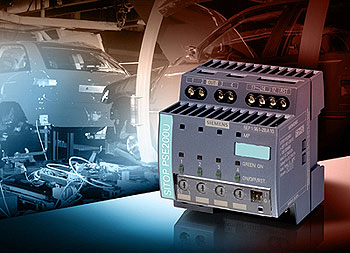
When overloads and short circuits occur, there’s always a tradeoff between the power supply shutting down the entire 24 VDC supply and keeping load circuits that aren’t impacted by the failure continuing to run. The new SITOP PSE200U electronic diagnostic module from Siemens Industry Automation Division constantly monitors up to four 24 VDC load circuits for overloads and short circuits.
siemens-tia-10.jpg
“Today’s switched-mode power supplies provide advanced functionality, by protecting 24 VDC loads against any kinds of overload. Unfortunately, it responds by shutting down the power supply to all load circuits even before a fuse or circuit breaker can trip on the circuit that is actually being overloaded. The result: Power is shut down to all 24 VDC load circuits, even those that aren’t affected,” says Kai Bronzel, product marketing manger, Siemens Industry. “The SITOP PSE200U electronic diagnostic module intelligently shuts down the current to the affected load circuit, without impacting the other load circuits that don’t have problems.” Furthermore, the SITOP PSE200U provides for sequential start up, which significantly reduces the total current required from the power supply during the start up phase of high inrush loads. This avoids the shutdown of the power supply when the total inrush current exceeds the current limitation of the power supply.
In order to more closely match the application, there are now two versions of the device with tripping current ranges of 0.5 to 3 and 3 to 10 amperes available. This is an improvement over the previous SITOP select model, which had a wide adjustment tripping current range of 2 to 10 amperes. Used as an additional component in switched mode regulated 24 VDC power supplies, the new SITOP PSE200U electronic diagnostic module detects not only slight overloads but also “creeping” short circuits on high-resistance cables. If an overload or short circuit occurs, the device switches off the current to the faulty path. This prevents the power supply voltage from dipping, thus ensuring that power continues to be supplied to all the other circuits not affected by the fault. Up to four load circuits per module can be protected. Additional electronic diagnostic modules can be connected to the power supply if the application requires the protection of more circuits.
The new SITOP PSE200U electronic diagnostic module has sealable potentiometer covers to protect the set tripping currents against unwanted changes. The three-color LED and signaling contact concept makes it simple to troubleshoot systems and get directly to the faults. Diagnostics data can be transmitted to a higher-level controller for remote diagnostics. The SITOP PSE200U allows fast commissioning due to switch on/off functionality by using individual reset buttons per circuit in front of the unit. In addition a remote reset from a higher level control system is also possible. In contrast to conventional miniature circuit breakers, which do not trip until the current rises to a multiple of the rated current, this new electronic diagnostic module already responds to an overload that is only slightly above the set tripping current. The device also differentiates between a sustained fault and a transitory, operational overcurrent. This enables short circuits to be detected even on high-resistance cables in which, for example, core cross-sections are small or there is a long distance to the load.

Click here for more information on SITOP PSE200U electronic diagnostic module.

Tuesday, March 23, 2010

Siemens Premium Studio 2009

Siemens AGImage via Wikipedia
Premium Studio 2009 provides you with the most important software packages for engineering and runtime for SIMATIC S7/C7, SIMATIC HMI, SIMATIC NET, SINUMERIK und SIMOTION on four data carriers (DVDs). The user can select general settings (e.g. languages for installation, installation path, etc.) and the software packages he requires via a setup specially created for Premium Studio. The installation is then performed automatically (silent), i.e. no further user activities are required. Premium Studio thus provides a significant time and money saving with the installation and maintenance of the software packages. No licenses are included with Premium Studio. For productive operation of the installed software products the user can either use his existing licenses of the versions in question or he must purchase new licenses. Premium Studio 2009 is now available for delivery. 


Product information
Premium Studio will significantly reduce the time and expenses for installation and maintenance of the Siemens Industrial Automation and Siemens Drives Technology software products. This will improve productivity and reduce the overall costs (Total cost of ownership). The benefit to the user increases all the more, the more software products from Siemens Industrial Automation and Siemens Drives Technology are being used.

Fully automatic installation by the Premium Studio Setup
  • One-time selection of the settings required for all software packages, e.g. installation path
  • No further user activities are needed during installation
  • Automatic updating of the existing PG/PC/PCU.50 installations by the products contained on the Premium Studio DVD 
Installation of the selected software in the correct sequence
  • The Premium Studio Setup ensures that any required installation sequences are adhered to.
Reduction of administration and handling (Zero Admin) 
  • Once the software products to be installed have been selected, the installation is performed without any further activities by the user.
  • The selection of the software products to be installed can be recorded by means of a RECORD function. This enables you to perform identical installations on any number of further computers, with a minimum of effort. 
  • The installation can be made from a central computer via the network in this case. The Premium Studio DVDs must either be copied to this central computer or kept in its DVD drive. Installation is then be performed over the network.
Compatibility and interoperability
An extended testing scenario ensures compatibility and interoperability of the product versions contained in Premium Studio. 
Licensing 

By purchasing Premium Studio, the user does not obtain the licenses for the included software products. Before productive use, the required licenses must be purchased through the usual sales channels. However, trial licenses are included for many of the products on the DVDs, with which the software can be tested for a limited period. 
Scope of delivery

The scope of delivery of Premium Studio includes four DVDs (double-layer). These DVDs comprise the individual products listed below. Licenses must be purchased separately as standard products.
Only the versions with their standard licences are listed (Floating or Single License). The upgrade versions of the listed software products can be found on the Siemens Internet Pages or the A&D Mall:
 
Product
Version
Order No.
SIMATIC STEP 7 (Floating License)
V5.4 SP4
6ES7810-4CC08-0YA5
     
Engineering Tools
   
SIMATIC S7-PDIAG (Single License)
V5.3 SP3
6ES7840-0CC04-0YA5
SIMATIC S7-HIGRAPH (Single License)
V5.3 SP1
6ES7811-3CC05-0YA5
SIMATIC S7-SCL (Floating License)
V5.3 SP5
6ES7811-1CC05-0YA5
SIMATIC S7-PLCSIM (Floating License)
V5.4 SP2
6ES7841-0CC05-0YA5
SIMATIC S7-GRAPH (Floating License)
V5.3 SP6
6ES7811-0CC06-0YA5
SIMATIC S7 Distributed Safety (Single License)
V5.4 SP4
6ES7833-1FC02-0YA5
SIMATIC S7 F Configuration Pack V5.5 SP5  
SIMATIC D7 SYS
V7.1
6ES7852-0CC02-0YA5
SIMATIC CFC
V7.1
6ES7658-1EX17-2YA5
SIMATIC Version Trail
V7.1
6ES7658-1FX17-2YA5
SIMATIC Version Cross Manager
V7.1
6ES7658-1CX17-2YA5
SIMATIC Logon
V1.4 SP1
6ES7 658-7BX41-2YA0
SIMATIC PDM
V6.0 SP5
6ES7658-3KX06-0YA5
SIMATIC Modular PID Control FB V5.1 6ES7860-1AA10-0YX0
SIMATIC Modular PID Control Tool V5.1 6ES7830-1AA10-0YX0
SIMATIC Standard PID Control FB  V5.2 6ES7860-2AA21-0YX0
SIMATIC Standard PID Control Tool V5.2 6ES7860-2AA21-0YX0
SIMATIC PID Self Tuner V5.1 6ES7860-4AA01-0YX0
SIMATIC Teleservice Software V6.1 SP2 6ES7842-0CE000YE0
     
Controller    
SIMATIC WinAC RTX 2008 SP1 6ES7 671-0RC06-0YA0
     
Maintenance Station    
SIMATIC Maintenance Station 2009 6ES7840-0WD01-0YA0
SIMATIC Maintenance Station Powerpack 100   6ES7840-0WD11-0YD0
SIMATIC Maintenance Station Powerpack 500   6ES7840-0WD21-0YD0
SIMATIC Maintenance Station Powerpack 1000   6ES7840-0WD31-0YD0
     
Drives
   
Drive ES Basic
V5.4 SP3
6SW1700-5JA00-4AA0
S7-Technology (T-Config)
V4.1 SP1
6ES7864-1CC41-0YX0
SIMOTION Scout
V4.1 SP2
6AU1810-0BA41-0XA0
     
Component-Based Automation
   
SIMATIC iMap
V3.0 SP1
6ES7820-0CC04-0YA5
     
SIMATIC NET Communication Software
   
SIMATIC NET PC products
2008
---
Ind. Ethernet
SOFTNET-S7 Lean 2008
+ Advanced PC Configuration
 
6GK1704-1LW71-3AA0
Ind. Ethernet
SOFTNET-S7 2008
+ Advanced PC Configuration
 
6GK1704-1CW71-3AA0
Ind. Ethernet
SOFTNET-PG 2008
+ Advanced PC Configuration
 
6GK1704-1PW71-3AA0
PROFIBUS
SOFTNET-S7 2008
+ Advanced PC Configuration
 
6GK1704-5CW71-3AA0
PROFIBUS
SOFTNET-DP 2008
+ Advanced PC Configuration
 
6GK1704-5DW71-3AA0
Ind. Ethernet
SNMP OPC Server Basic 2008
+ Advanced PC Configuration
 
6GK1706-1NW71-3AA0
Ind. Ethernet
SNMP OPC Server Extended 2008
+ Advanced PC Configuration
 
6GK1706-1NX71-3AA0
PROFIBUS
S7-5613 2008
+ Advanced PC Configuration
 
6GK1713-5CB71-3AA0
PROFIBUS
DP-5613 2008
+ Advanced PC Configuration
 
6GK1713-5DB71-3AA0
PROFIBUS
FMS-5613 2008
+ Advanced PC Configuration
 
6GK1713-5FB71-3AA0
Ind. Ethernet
S7-REDCONNECT 2008
+ Advanced PC Configuration
 
6GK1716-0HB71-3AA0
Ind. Ethernet
Upgrade S7-REDCONNECT 2008 Powerpack
+ Advanced PC Configuration
 
6GK1716-0HB71-3AC0
Ind. Ethernet
S7-1613 2008
+ Advanced PC Configuration
 
6GK1716-1CB71-3AA0
Ind. Ethernet
TF-1613 2008
+ Advanced PC Configuration
 
6GK1716-1TB71-3AA0
     
SIMATIC HMI Software
   
SIMATIC WinCC
V7.0 SP1
 
128 PowerTags (RT 128) incl. 512 archive variables
 
6AV6381-2BC07-0AX0
512 PowerTags (RT 512) incl. 512 archive variables
 
6AV6381-2BD07-0AX0
2048 PowerTags (RT 2048) incl. 512 archive variables
 
6AV6381-2BE07-0AX0
8192 PowerTags (RT 8192) incl. 512 archive variables
 
6AV6381-2BH07-0AX0
65536 PowerTags (RT 65536) incl. 512 archive variables
 
6AV6381-2BF07-0AX0
102400 PowerTags (RT 102400) incl. 512 archive variables
 
6AV6381-2BJ07-0AX0
153600 PowerTags (RT 153600) incl. 512 archive variables
 
6AV6381-2BK07-0AX0
262144 PowerTags (RT 262144) incl. 512 archive variables
 
6AV6381-2BL07-0AX0
128 PowerTags (RC 128) incl. 512 archive variables
 
6AV6381-2BM07-0AX0
512 PowerTags (RC 512) incl. 512 archive variablesn
 
6AV6381-2BN07-0AX0
2048 PowerTags (RC 2048) incl. 512 archive variables
 
6AV6381-2BP07-0AX0
8192 PowerTags (RT 8192) incl. 512 archive variables
 
6AV6381-2BS07-0AX0
65536 PowerTags (RC 65536) incl. 512 archive variables
 
6AV6381-2BQ07-0AX0
102400 PowerTags (RC 102400) incl. 512 archive variables
 
6AV6381-2BT07-0AX0
153600 PowerTags (RC 153600) incl. 512 archive variables
 
6AV6381-2BU07-0AX0
262144 PowerTags (RC 262144) incl. 512 Archivvariablen
 
6AV6381-2BV07-0AX0
SIMATIC WinCC/Archive 1500
1500 archive variables
 
6AV6371-1DQ17-0AX0
SIMATIC WinCC/Archive 5000
5000 archive variables
 
6AV6371-1DQ17-0BX0
SIMATIC WinCC/Archive 10000
10000 archive variables
 
6AV6371-1DQ17-0CX0
SIMATIC WinCC/Archive 30000
30000 archive variables
 
6AV6371-1DQ17-0EX0
SIMATIC WinCC/Archive 80000
80000 archive variables
 
6AV6371-1DQ17-0GX0
SIMATIC WinCC/Archive 120000
120000 archive variables
 
6AV6371-1DQ17-0JX0
SIMATIC WinCC/Server
 
6AV6371-1CA07-0AX0
SIMATIC WinCC//Redundancy
 
6AV6371-1CF07-0AX0
SIMATIC WinCC//User Archives
 
6AV6371-1CB07-0AX0
SIMATIC WinCC/ProAgent
V7.0 SP1
6AV6371-1DG07-0AX0
SIMATIC WinCC/Web-Navigator incl. 3 Client licenses
V7.0
6AV6371-1DH07-0AX0
SIMATIC WinCC/Web-Navigator incl. 10 Client licenses
V7.0
6AV6371-1DH07-0BX0
SIMATIC WinCC/Web-Navigator incl. 25 Client licenses
V7.0
6AV6371-1DH07-0CX0
SIMATIC WinCC/Web-Navigator incl. 50 Client licenses
V7.0
6AV6371-1DH07-0DX0
SIMATIC WinCC/Web-Navigator Diagnose Client
V7.0
6AV6371-1DH07-0EX0
SIMATIC WinCC/Web-Navigator Diagnostic Server
V7.0
6AV6371-1DH07-0FX0
SIMATIC WinCC/Connectivity Pack
V7.0
6AV6371-1DR07-0AX0
SIMATIC WinCC/Connectivity Station
V7.0
6AV6371-1DR17-0AX0
SIMATIC WinCC/DataMonitor incl. 1 Client license
V7.0
6AV6371-1DN07-0LX0
SIMATIC WinCC/DataMonitor incl. 3 Client licenses
V7.0
6AV6371-1DN07-0AX0
SIMATIC WinCC/DataMonitor incl. 10 Client licenses
V7.0
6AV6371-1DN07-0BX0
SIMATIC WinCC/DataMonitor incl. 25 Client licenses
V7.0
6AV6371-1DN07-0CX0
SIMATIC WinCC/DataMonitor incl. 50 Client licenses
V7.0
6AV6371-1DN07-0DX0
SIMATIC WinCC flexible Compact
2008 SP1
6AV6611-0AA51-3CA5
SIMATIC WinCC flexible Standard
2008 SP1
6AV6612-0AA51-3CA5
SIMATIC WinCC flexible Advanced
2008 SP1
6AV6613-0AA51-3CA5
SIMATIC WinCC flexible /ChangeControl for WinCC flexible Compact/Standard/Advanced
2008
6AV6613-6AA01-3AB5
SIMATIC WinCC flexible /Sm@rtAccess for SIMATIC Panel
2008
6AV6618-7AB01-3AB0
SIMATIC WinCC flexible /Sm@rtAccess for WinCC flexible Runtime
2008
6AV6618-7AD01-3AB0
SIMATIC WinCC flexible /Sm@rtService for SIMATIC Panel
2008
6AV6618-7BB01-3AB0
SIMATIC WinCC flexible /Sm@rtService for WinCC flexible Runtime
2008
6AV6618-7BD01-3AB0
SIMATIC WinCC flexible /OPC-Server for SIMATIC Multi Panel
2008
6AV6618-7CC01-3AB0
SIMATIC WinCC flexible /OPC-Server for WinCC flexible Runtime
2008
6AV6618-7CD01-3AB0
SIMATIC WinCC flexible /Archives for WinCC flexible Runtime
2008
6AV6618-7ED01-3AB0
SIMATIC WinCC flexible /Recipes for WinCC flexible Runtime
2008
6AV6618-7FD01-3AB0
SIMATIC WinCC flexible /Archives+Recipes for WinCC flexible Runtime
2008
6AV6618-7GD01-3AB0
SIMATIC WinCC flexible Runtime, 128 Power Tags
2008 SP1
6AV6613-1BA51-3CA0
SIMATIC WinCC flexible Runtime, 512 Power Tags
2008 SP1
6AV6613-1DA51-3CA0
SIMATIC WinCC flexible Runtime, 2048 Power Tags
2008 SP1
6AV6613-1FA51-3CA0
SIMATIC WinCC flexible Runtime, 4096 Power Tags
2008 SP1
6AV6613-1GA51-3CA0
SIMATIC WinCC flexible /ProAgent for SIMATIC Panel
2008
6AV6618-7DB01-3AB0
SIMATIC WinCC flexible /ProAgent for WinCC flexible Runtime
2008
6AV6618-7DD01-3AB0
SIMATIC WinCC flexible /Audit for SIMATIC Panel
2008
6AV6618-7HB01-3AB0
SIMATIC WinCC flexible /Audit for WinCC flexible Runtime
2008
6AV6618-7HD01-3AB0
     
SINUMERIK HMI Software
   
SIMATIC STEP7 for SINUMERIK Hardware
V5.4 SP4
6FC5252-5AY01-4AG0
SINUMERIK Toolbox 810D/840D Add-on for STEP7
V5.4 SP4
no separate order no.
TRANSLINE 2000 HMI Pro RT
V7.2.0.5
6FC5263-0PY50-0AG0
TRANSLINE 2000 HMI Pro CS
V7.2.0.5
6FC5263-0PY80-0AG0
HMI Advanced
V7.3 SP3
6FC5253-7BX10-3AG0
SINUMERIK HMI for WinCC flexible
2008
6FC5253-1CX25-3AG0
     
     
A&D Data management
   
A&D DataManagement Agent
V1.2
6BQ3030-1AA00-1AB0
A&D DataManagement Client
V6.1
6BQ3030-1AA20-1AC0
     
Sensors & Communication    
SIMATIC RFID Systems (RF170C)
V1.3.3
6GT2080-2AA10
SIMATIC RF-MANAGER - 1 Reader
2008
6GT2080-3CA00-8AA5
SIMATIC RF-MANAGER - 5 Readers
2008
6GT2080-3CC00-8AA5
SIMATIC RF-MANAGER - 20 Readers
2008
6GT2080-3CE00-8AA5
SINEMA E Lean 2006 SP3 6GK1781-0AA00-6AA0  
SINEMA E Standard 2006 SP3 6GK1782-0AA00-6AA0
     
SIRIUS Tools
   
Sirius Motor Starter ES Premium (Floating License)
2007 SP1
3ZS1 310-6CC10-0YA5
Sirius Motor Starter ES Standard (Floating License)
2007 SP1
3ZS1 310-5CC10-0YA5
Sirius Motor Starter ES Basic (Floating License)
2007 SP1
3ZS1 310-4CC10-0YA5
Sirius Soft Starter ES Premium (Floating License) 
2007 SP1
3ZS1 313-6CC10-0YA5
Sirius Soft Starter ES Standard (Floating License) 
2007 SP1
3ZS1 313-5CC10-0YA5
Sirius Soft Starter ES Basic (Floating License)
2007 SP1
3ZS1 313-4CC10-0YA5
Sirius SIMOCODE ES Premium (Floating License) 
2007 SP1
3ZS1 312-6CC10-0YA5
Sirius SIMOCODE ES Standard (Floating License)
2007 SP1
3ZS1 312-5CC10-0YA5
Sirius SIMOCODE ES Basic (Floating License) 
2007 SP1
3ZS1 312-4CC10-0YA5
Sirius Modular Safety System ES 2008 3ZS1314-5CC10-0YA5
Please note:
  • The products STEP 7, S7-SCL, S7-GRAPH and S7-PLCSIM are also available as a bundle in "STEP 7 Professional".
  • Existing product licenses can be upgraded with the upgrade licenses provided for this purpose.
Installation requirements
Hardware requirements 
Premium Studio includes software packages for different target systems. A difference is made between PGs/PCs (Programming devices / PCs) and the PCU50 target system (target system of the SINUMERIK HMI runtime software). To be able work with the software on these DVDs, you require one of the following two hardware platforms and a DVD drive:
  • A programming device or a PC with Pentium III microprocessor or better and at least 256 MB RAM. We recommend a Pentium IV microprocessor with min. 512 MB RAM. The required space on the hard disk is approx. 15 GB for a complete installation of all the included software packages.
     
  • PCU50 with 566 MHz microprocessor and min. 256 MB RAM. We recommend a microprocessor with 1.2 GHz and 256 MB RAM. The required space on the hard disk depends on the scope of the installation and is up to 3 GB for the installed software. 
The Premium Studio Setup automatically identifies the target system and offers only the relevant products for installation.
Operating system / software requirements
  • Microsoft Windows XP Professional Service Pack 2
  • Microsoft Windows Vista Business / Ultimate (not all included products support this operating system)
  • WinCC requires the WinCC embedded SQL server for operation (supplied together with Premium Studio).
Readme files
The Readme file on the DVD provides more information on the products.
You can read it as pdf::
Ordering information
Designation Order No.
Premium Studio 2009, on DVD with Trial Licenses for many of the included software products. 6ES7815-8CD08-0YA7
Premium Studio Software Update Service (SUS). The scope of delivery only includes the data carrier (DVD) with Trial License. 6ES7815-8CD00-0YL7
For more information please go to the Siemens Internet Pages or the A&D Mall, or you can speak to your SIMATIC partner at your local Siemens office (SIMATIC partners in the Internet)

Reblog this post [with Zemanta]
#